Snowflake Zero-Copy Cloning: Architecture & Cost Benefits

Usman AshrafJul 16, 2025
Snowflake Cloning Cost Efficiency

Introduction


If you have managed a traditional enterprise data warehouse, you understand the operational friction of duplicating large datasets for testing, QA, or advanced analytics. Creating full physical copies requires massive storage overhead, extended data movement pipelines, and significantly higher cloud bills.

Snowflake eliminates this bottleneck through zero-copy cloning. This feature allows data engineering teams to instantly replicate a table, schema, or entire database without physically moving the underlying data files. By utilizing metadata pointers rather than physical replication, zero-copy cloning removes upfront storage costs and deployment wait times, fundamentally changing how data teams build sandbox environments and execute safe production rollbacks.

The Architecture: How Zero-Copy Cloning Actually Works

To understand the efficiency of zero-copy cloning, you must understand Snowflake's decoupled storage and compute architecture. Snowflake stores all data in immutable, compressed blocks called micro-partitions.

When you execute a zero-copy clone, Snowflake does not copy these micro-partitions. Instead, the Cloud Services layer simply generates a new set of metadata pointers that reference the exact same underlying physical files as the source object.

Because the micro-partitions are immutable, they cannot be changed. Snowflake utilizes a Copy-on-Write (CoW) mechanism.

  • The clone is created instantly and costs exactly $0 in additional storage.
  • If a developer executes an UPDATE, INSERT, or DELETE statement on the cloned table, Snowflake writes the new data to new micro-partitions.
  • The clone's metadata is updated to point to the new micro-partitions, while the original source table remains completely untouched. You only pay storage costs for the net-new delta changes.

Traditional Duplication vs. Metadata Cloning
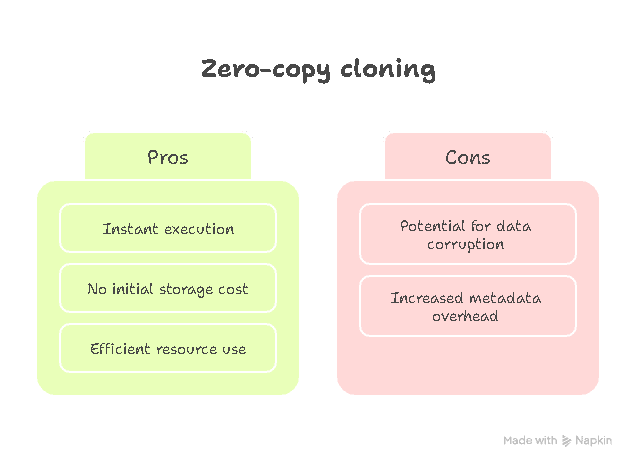
Zero Copy Cloning Pros Cons

How does Snowflake's metadata-driven approach compare to legacy database replication?

Feature

Legacy Data Duplication

Snowflake Zero-Copy Cloning

Execution Speed

Hours to days (depends on data volume).

Instantaneous (metadata operation only).

Storage Cost

2x storage multiplier immediately.

$0 initial cost. Bills only for mutated delta records.

Pipeline Overhead

Requires heavy INSERT INTO... SELECT ETL pipelines.

Single DDL command (CREATE ... CLONE).

Compute Usage

Consumes heavy warehouse processing power to move data.

Uses zero virtual warehouse compute (handled by Cloud Services layer).

Unlike legacy environments that require complex pipelines to move data, Snowflake handles cloning with a single Data Definition Language (DDL) command. You can clone at the table, schema, or database level:

SQL
-- Instantly clone a single table for a developer
CREATE TABLE sales_dev CLONE sales_prod;

-- Clone an entire schema without moving any physical data
CREATE SCHEMA marketing_qa CLONE marketing_prod;

Enterprise Engineering Use Cases

Zero-copy cloning unlocks operational agility that is impossible on legacy platforms. Data teams leverage this architecture for three primary workflows:

Instant Development & QA Sandboxes

Engineers can spin up an exact replica of a 10TB production database in seconds to test destructive DDL changes (like dropping columns or restructuring schemas) without risking live operational data.


Point-in-Time Analytics (Time Travel Synergy)

Because cloning integrates seamlessly with Snowflake's Time Travel feature, you can clone a database exactly as it existed before a catastrophic pipeline failure. This allows data scientists to run historical analyses or recover corrupted tables effortlessly.

SQL
-- Instantly clone a production database to its exact state from yesterday
CREATE DATABASE dev_db CLONE prod_db 
  AT (TIMESTAMP => '2026-06-04 12:00:00 -0700'::timestamp_tz);

Machine Learning Model Training

Data scientists can explore massive datasets, transform features, and train predictive models on isolated clones without interfering with the primary BI reporting workloads or consuming heavy data engineering resources to provision environments.

The Economic Impact: Reducing Cloud Spend

While cloning is a technical feature, its primary value proposition is financial optimization.

  • Eliminates Upfront Storage Duplication: You completely bypass the storage doubling penalty. If you maintain separate PROD, DEV, and STAGING environments, cloning ensures you are only paying for the data deviations, not the baseline storage.
  • Reduces Compute Consumption: Because data is not physically moved, you do not need to spin up Large or X-Large virtual warehouses to run duplication pipelines.
  • Deprecates Heavy ETL Pipelines: Removing the need to build, maintain, and monitor "copy-down" data pipelines saves hundreds of hours of expensive data engineering time annually.

Best Practices & Governance

To maximize cost efficiency without introducing architectural sprawl, enforce these strict governance rules across your Snowflake deployment:

  • Monitor Divergence Growth: As soon as you mutate data within a clone, it begins consuming storage. Regularly audit long-living clones to ensure they aren't quietly racking up storage bills due to heavy background inserts.
  • Combine with Transient Architecture: If a clone is purely for temporary analysis or a sprint-based QA test, clone it as a Transient Table. This bypasses Snowflake's 7-day Fail-safe storage mechanism, preventing hidden storage retention costs. (Curious about managing short-lived data? Read our breakdown on Transient Tables and Snowflake Cost Efficiency).
SQL
-- Create a transient clone that automatically avoids long-term Fail-safe storage costs
CREATE TRANSIENT TABLE weekly_qa_clone CLONE production_data;
  • Audit Clone Lineage: Use the ACCOUNT_USAGE.CLONES view to track the lifecycle of cloned objects and establish automated teardown scripts for orphaned developer environments.

Conclusion: Scaling Agility

Snowflake’s zero-copy cloning is not merely a technical luxury; it is a foundational cost-control mechanism for modern data architectures. By allowing engineering teams to experiment, QA, and recover data without paying double for storage or waiting hours for pipeline execution, cloning fundamentally increases developer velocity. When paired with strict RBAC governance and transient table architectures, zero-copy cloning keeps your cloud data ecosystem agile, highly scalable, and strictly budget-friendly.

Book a Free 30-Minute Meeting

Discover how our services can support your goals — no strings attached. Schedule your free 30-minute consultation today and let's explore the possibilities.

Book a Free Call

Frequently Asked Questions

No. Creating a zero-copy clone is a pure metadata operation handled by Snowflake's Cloud Services layer. It does not require an active virtual warehouse and will not consume compute credits during the actual cloning process.

The cloned table will remain fully intact and accessible. Because Snowflake's micro-partitions are independent of the logical tables, the micro-partitions will continue to exist as long as the cloned table's metadata references them, even if the source object is dropped.

No. Zero-copy cloning can only occur within the same Snowflake account and within the same cloud region. To move data across different regions or from AWS to Azure, you must utilize Snowflake's Cross-Cloud Replication features, which physically moves the data and incurs transfer costs.

No. A clone does not inherit the historical Time Travel data of its source object. The clone's Time Travel history begins exactly at the moment it is created.

You can query the TABLE_STORAGE_METRICS view within the INFORMATION_SCHEMA. By comparing the ACTIVE_BYTES to the CLONE_BYTES, data engineers can calculate exactly how much storage the clone shares with the source versus how much net-new data it has generated.

SQL
-- Calculate the net-new storage cost of a cloned table
SELECT 
    TABLE_NAME, 
    ACTIVE_BYTES / (1024*1024*1024) AS total_logical_gb, 
    CLONE_BYTES / (1024*1024*1024) AS independent_clone_gb 
FROM INFORMATION_SCHEMA.TABLE_STORAGE_METRICS 
WHERE TABLE_NAME = 'SALES_DEV';
Book Consultation