
Table of Contents
Introduction
For years, dbt Core has been the go-to solution for transforming data with SQL. It brought software engineering practices — like version control, testing, and documentation — into analytics. But as organizations scale across multiple teams, warehouses, Sand BI tools, many have started to hit familiar challenges:
- the same metric appears with different values in different dashboards
- pipelines break without warning because of hidden upstream changes
- SQL models become harder to maintain as the DAG grows
- teams use separate tools for scheduling, deployment, governance, and lineage
- development becomes slow and error-prone
- cloud warehouse bills climb without visibility into why
This is where dbt Fusion comes in.
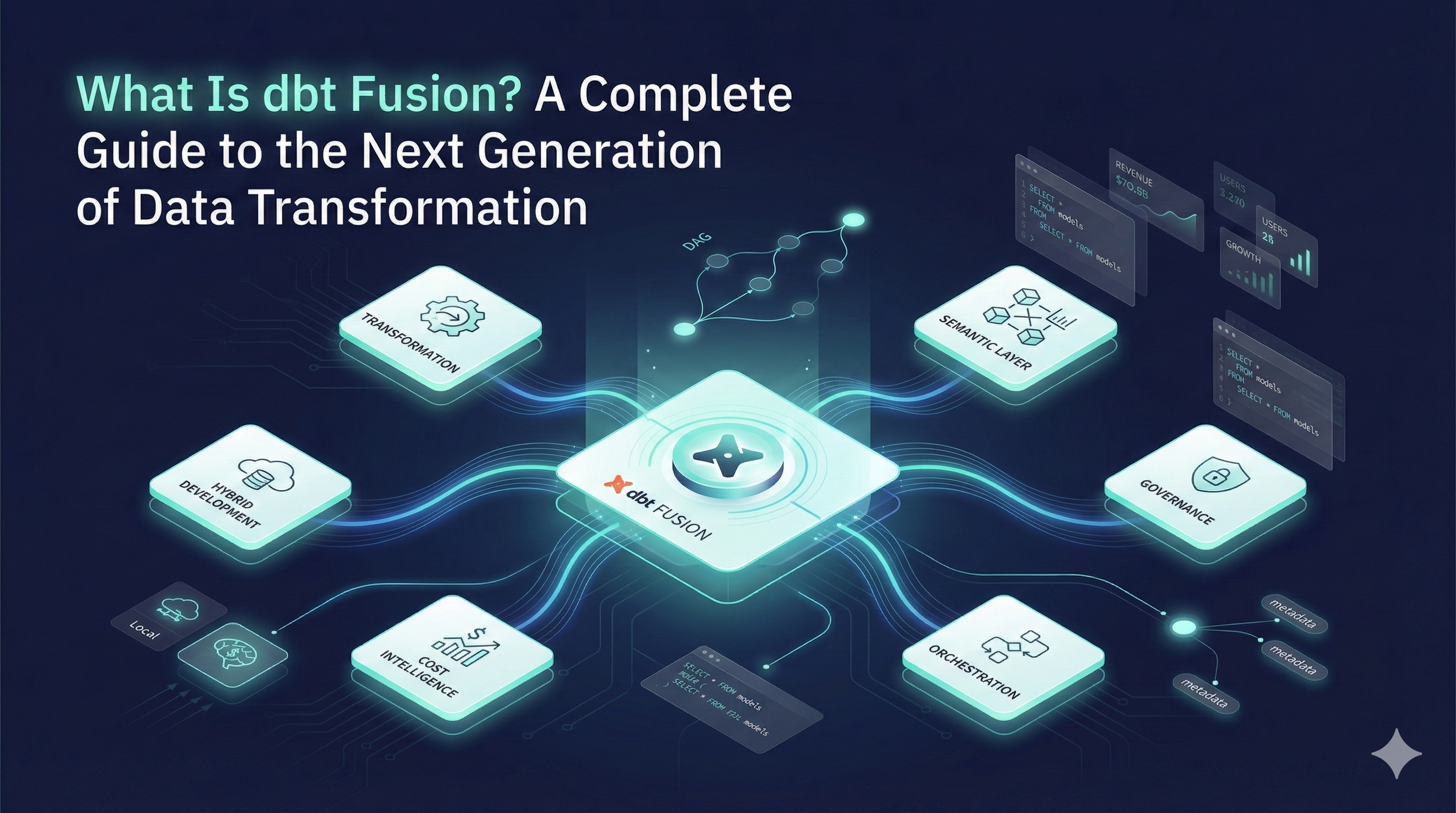
dbt Fusion is the next evolution of dbt — a new, unified transformation engine designed to make analytics engineering faster, safer, and more scalable. It brings together everything teams already love about dbt, while solving the pain points that dbt Core alone can’t handle.
With dbt Fusion, teams get:
- a much faster, Rust-powered engine
- a shared semantic layer for consistent metrics across BI tools
- a hybrid development environment (local + cloud)
- built-in governance, role-based access, and audit logs
- cost-aware transformations for Snowflake & BigQuery
- metadata-driven orchestration and impact analysis
Instead of stitching together separate tools for Git, CI/CD, orchestration, documentation, and governance, dbt Fusion puts all of these pieces into one connected platform.
In this guide, we’ll walk through what dbt Fusion is, how it works, and why it represents a major shift in how modern data teams build and maintain analytics pipelines.
Whether you’re new to dbt or an experienced analytics engineer, this guide will give you a clear, practical understanding of why dbt Fusion matters — and how it can transform your workflow.
What Is dbt Fusion?
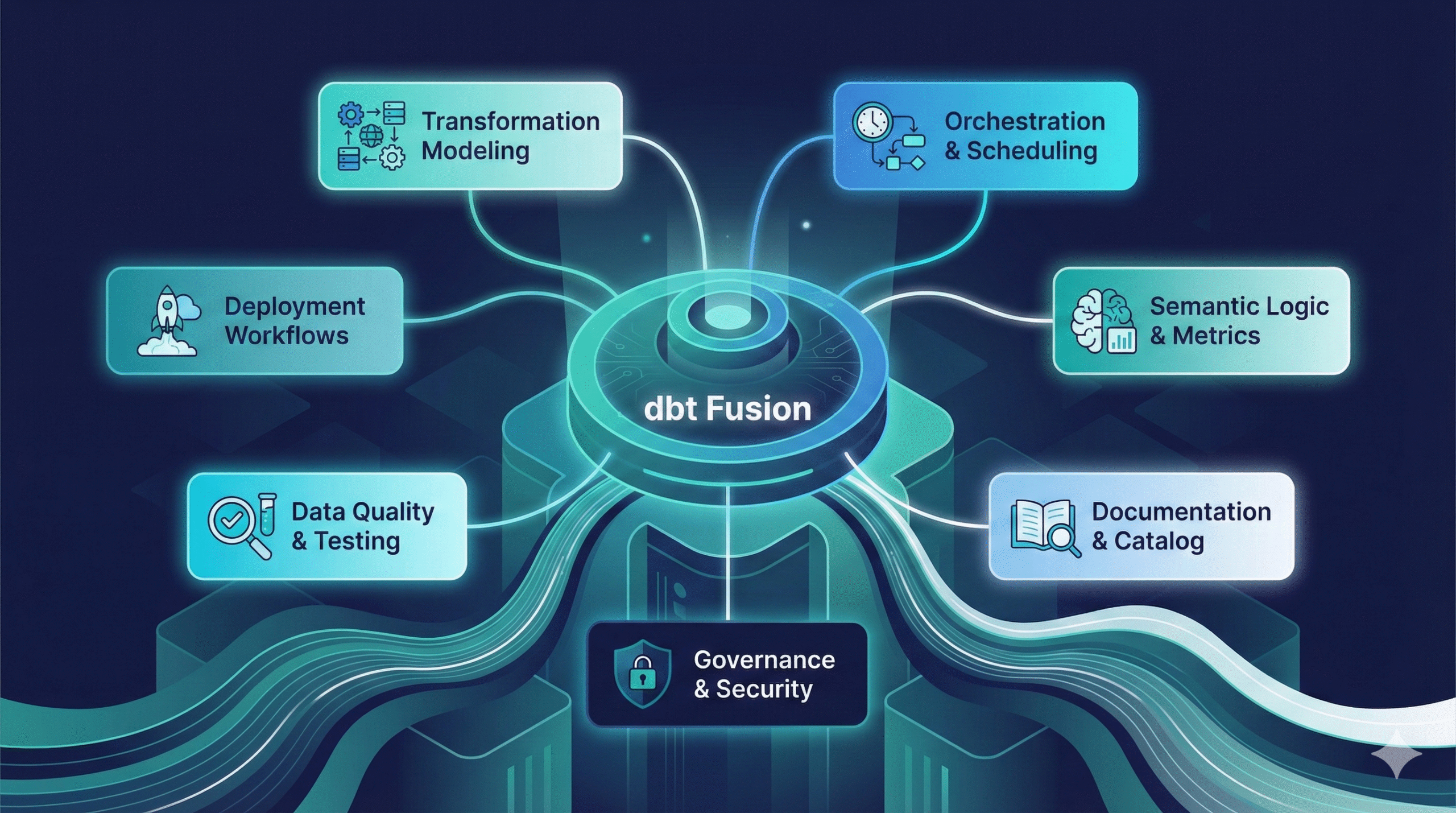
dbt Fusion is the next major evolution of the dbt ecosystem — a unified, modular data transformation platform designed to help teams build, test, govern, and deploy analytics pipelines more efficiently.
If dbt Core was the foundation of modern analytics engineering, dbt Fusion is the full house built on top of it.
Instead of relying on multiple separate tools for development, scheduling, documentation, approvals, semantic modeling, and governance, dbt Fusion brings all of these capabilities together in one connected system.
At its core, dbt Fusion combines several key components that dramatically improve both development speed and operational reliability:
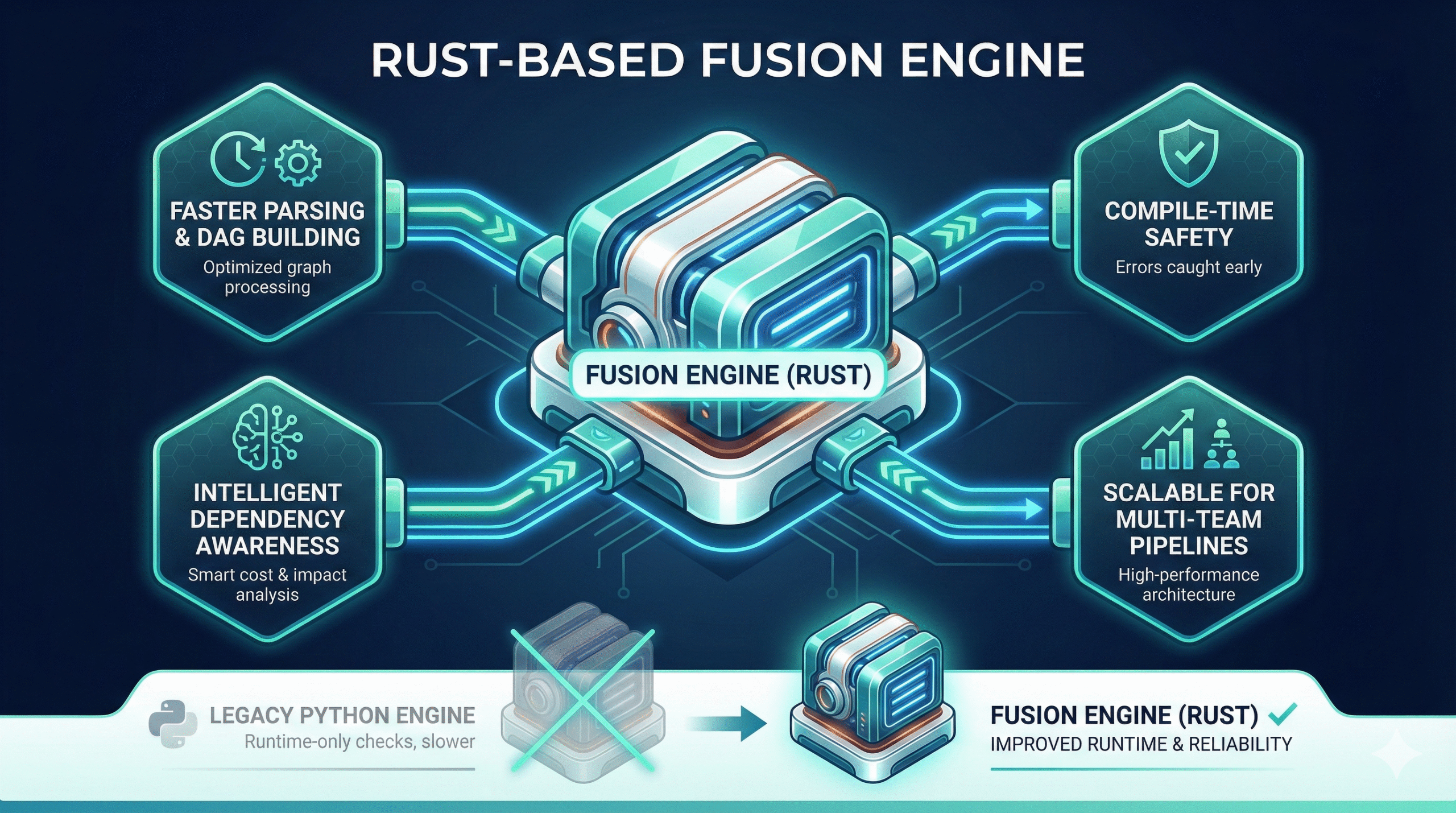
1. A New Rust-Based Fusion Engine
This is one of the biggest upgrades.
The Fusion engine is:
- faster (significantly faster parsing and DAG building)
- safer (errors caught at compile time, not run time)
- more intelligent (aware of dependencies, costs, and expected impact)
- more scalable (built for large, multi-team pipelines)
It replaces parts of dbt Core’s Python-based engine with a high-performance system that improves both runtime and reliability.
2. A Hybrid Development Environment (Local + Cloud)
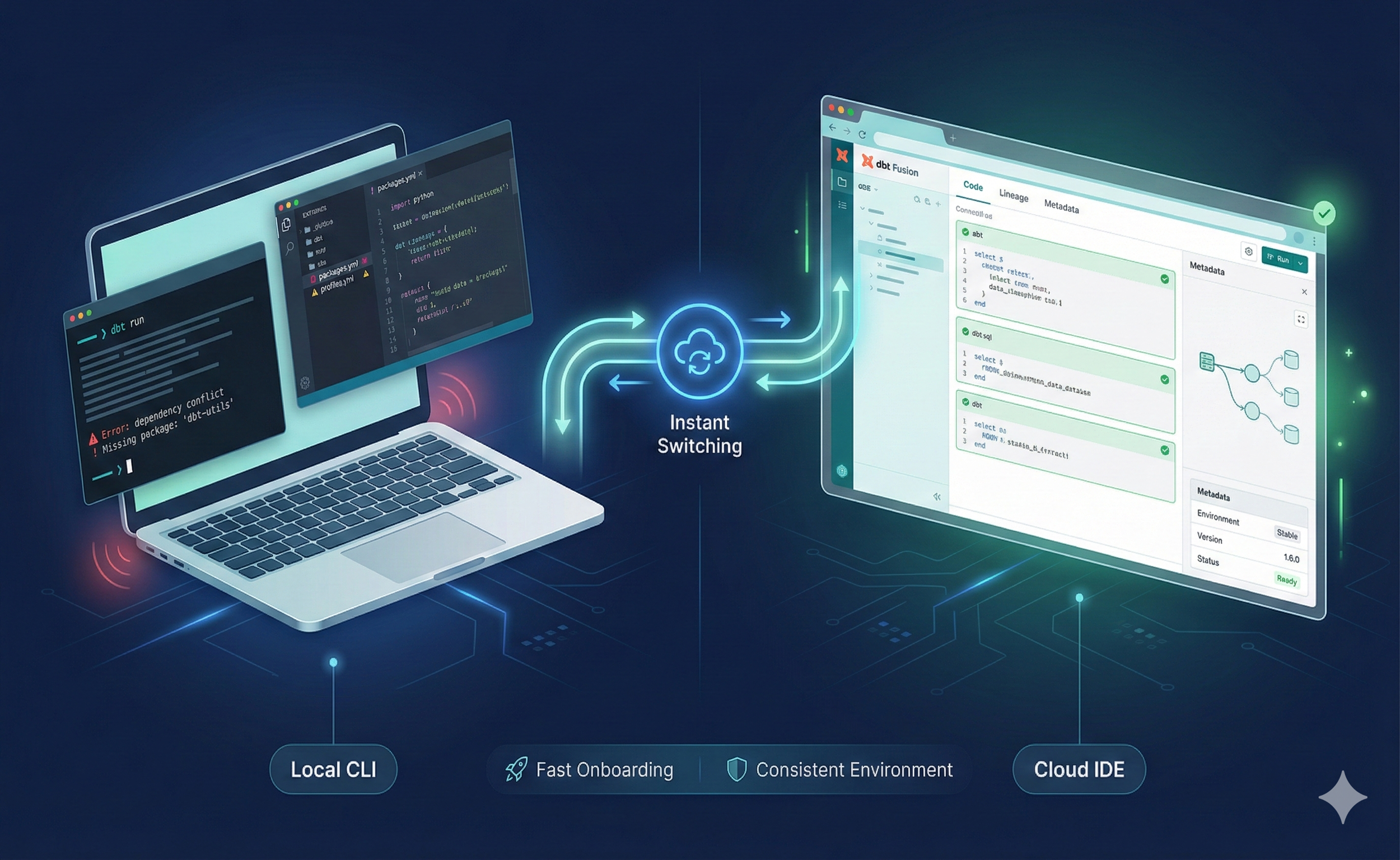
dbt Fusion gives developers the flexibility to work however they prefer:
- locally, through the CLI or a local editor
- in the cloud, through a browser-based IDE
- or switch between both instantly
This solves long-standing issues like:
- inconsistent local setups
- dependency conflicts
- missing packages
- onboarding delays
- broken local environments
A new developer can now start working on a dbt project in minutes — not hours.
3. A Centralized Semantic Layer
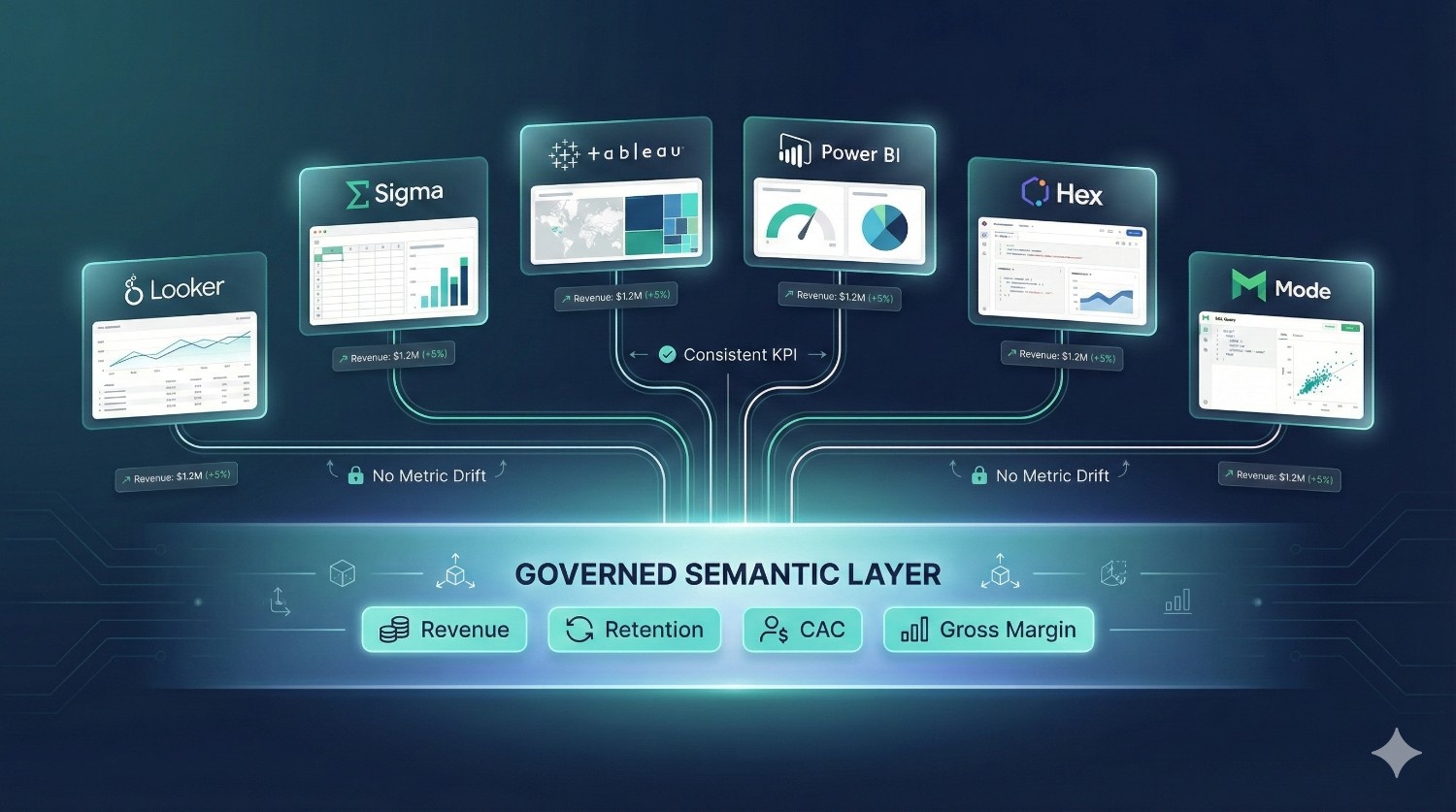
One of dbt Fusion’s most valuable additions is its universal semantic layer, which lets teams define:
- metrics
- dimensions
- business logic
…once, centrally.
These definitions can then be used across BI tools like:
- Looker
- Sigma
- Hex
- Mode
- Tableau
- Power BI
This eliminates metric drift — the common problem where different dashboards show different numbers for the same KPI.
4. Git-Native Workflows
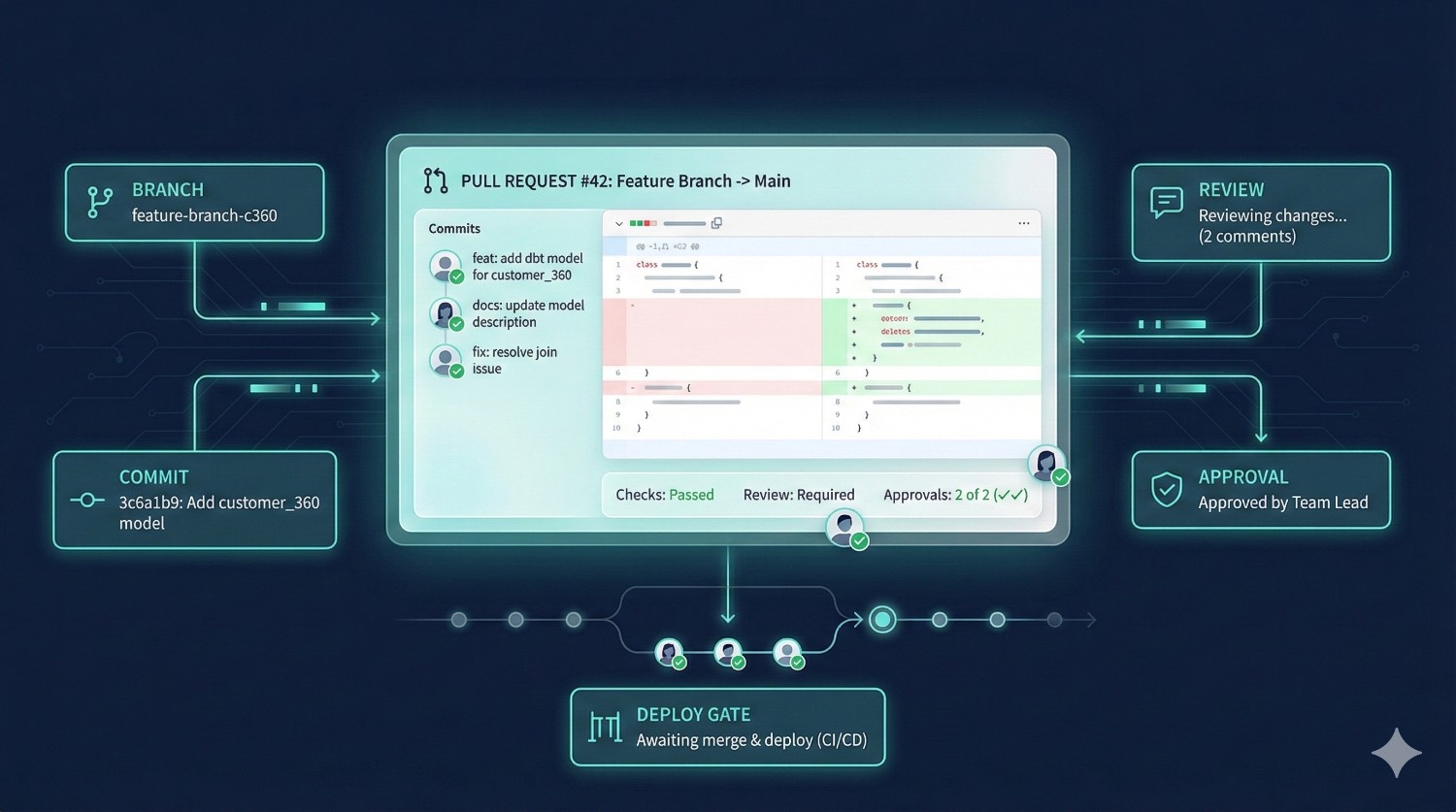
dbt Cloud previously supported Git, but Fusion makes Git the primary system of record—every model, metric, doc, test, and deployment now runs directly from Git, enabling real CI/CD, branch-based environments, and fully Git-native development workflows.
dbt Fusion integrates Git deeply into the platform:
- branch creation
- commits
- pull requests
- reviews
- approvals
- deployment gates
All happen inside Fusion, without needing to switch tools.
For teams, this means:
- cleaner collaboration
- structured code reviews
- safer deployments
- better visibility into changes
This is especially useful in companies with multiple analytics and engineering teams working in the same project.
5. Metadata-Driven Orchestration
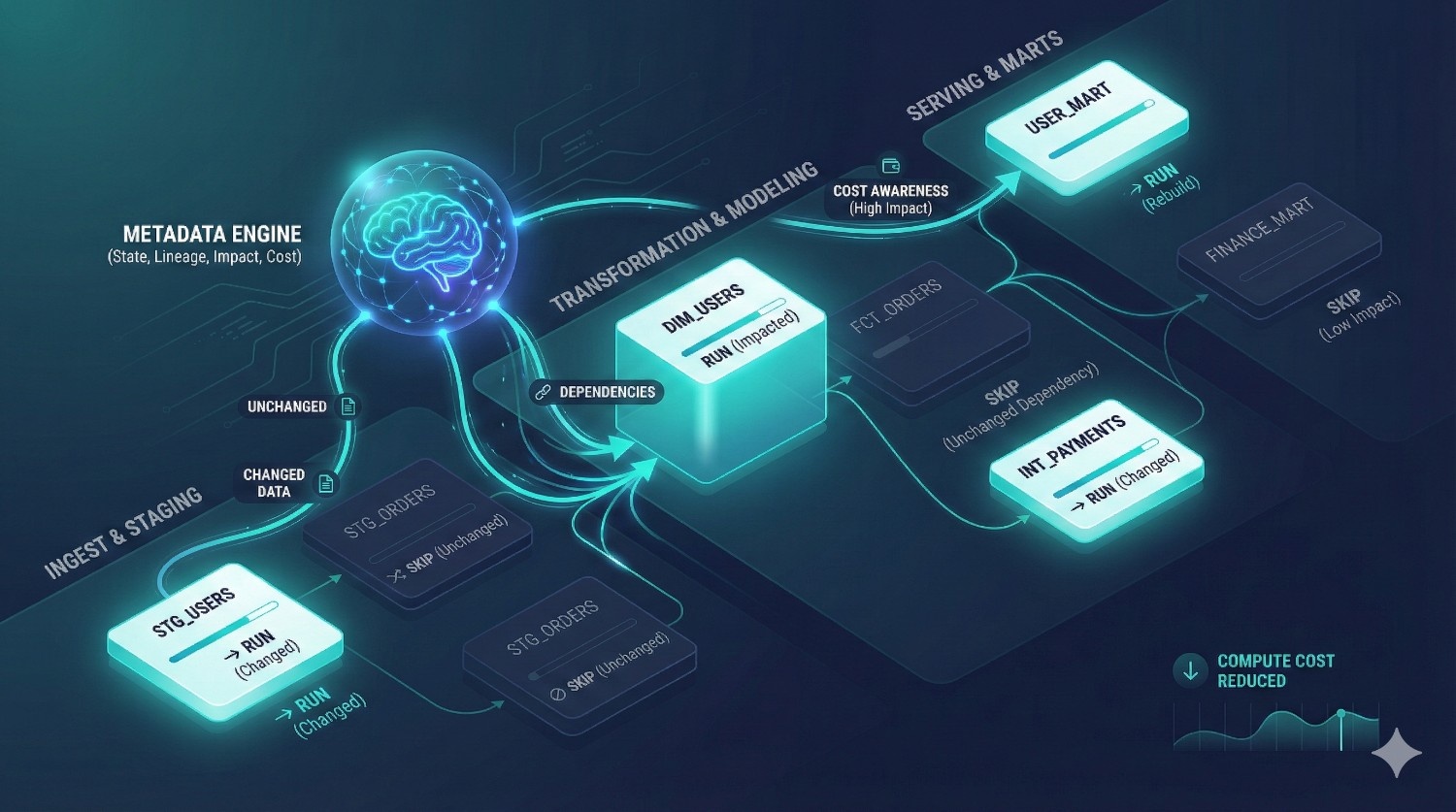
Traditional orchestration tools (Airflow, Prefect, Dagster) rely mostly on DAG structure and schedule definitions.
Fusion uses metadata to:
- run only what changed
- avoid unnecessary rebuilds
- detect model dependencies
- understand cost implications
- skip downstream models when inputs didn’t change
This saves cloud compute costs and dramatically reduces pipeline failures.
6. Built-In Governance (RBAC, Audit Logs, Model Ownership)
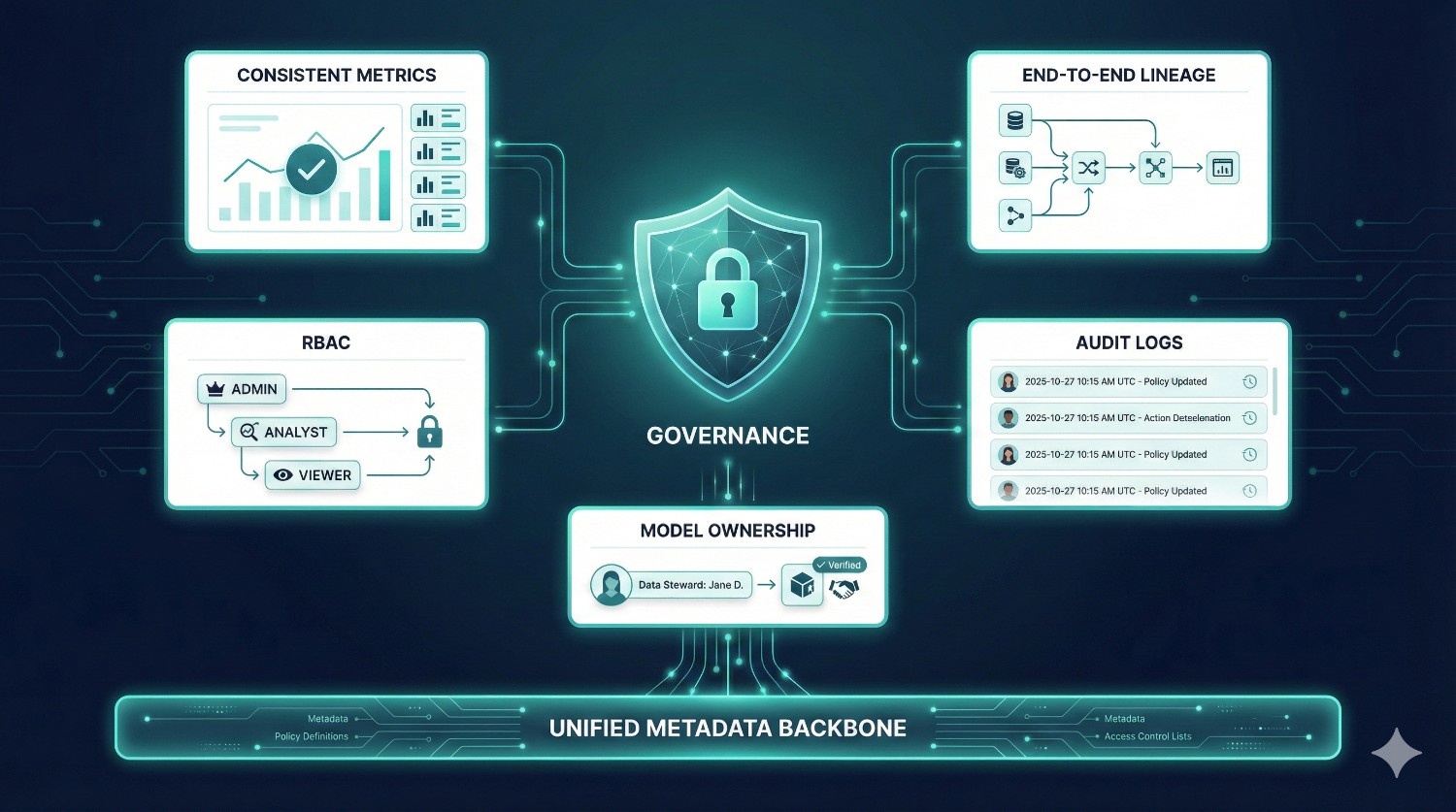
dbt Fusion introduces:
- role-based access control (RBAC)
- audit trails
- ownership assignment for models
- structured approval processes
- environment isolation (dev/staging/prod)
This makes Fusion enterprise-friendly by ensuring:
- safer deployments
- clearer accountability
- compliance support
- fewer accidental changes to critical models
dbt Fusion vs dbt Core
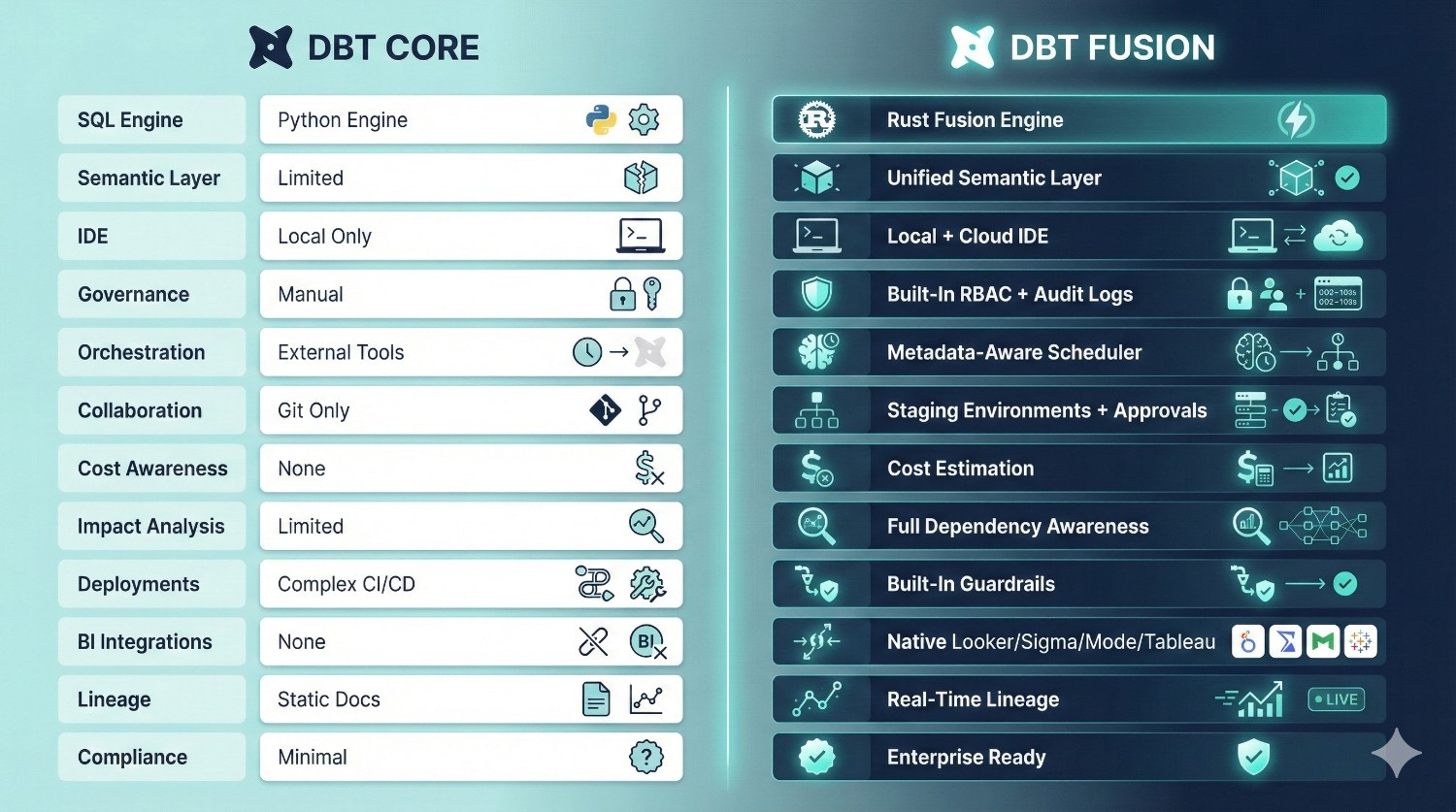
Below is an expanded comparison table with clearer explanations to help both beginners and technical readers understand the differences.
|
Feature
|
dbt Core
|
dbt Fusion
|
Why It Matters
|
|---|---|---|---|
|
SQL Compilation Engine
|
Python-based
|
Rust-based Fusion Engine
|
Fusion is faster, safer, and handles large DAGs more efficiently.
|
|
Semantic Layer
|
Limited (metrics deprecated)
|
Fully integrated, universal semantic layer
|
Prevents metric drift and standardizes KPIs across BI tools.
|
|
IDE
|
Local only (CLI + editor)
|
Hybrid (local + cloud IDE)
|
Faster onboarding, consistent setups, cloud previews, fewer environment issues.
|
|
Governance
|
Manual, scattered across tools
|
Built-in RBAC, audit logs, model ownership
|
Critical for enterprises, compliance-heavy teams, and multi-team collaboration.
|
|
Orchestration
|
Requires external tools (Airflow, Prefect)
|
Native metadata-aware scheduler
|
Fewer tools to manage, smarter runs, cost savings.
|
|
Collaboration
|
Git-only, no environment isolation
|
Staging environments, approvals, per-user sandboxes
|
Prevents developers from stepping on each other’s changes.
|
|
Cost Awareness
|
None
|
Built-in cost estimation & warnings
|
Avoids expensive Snowflake/BigQuery queries before they run.
|
|
Impact Analysis
|
Limited
|
Full dependency and downstream impact analysis before deployment
|
Prevents breaking dashboards or downstream models.
|
|
Complex CI/CD setup
|
Complex CI/CD setup
|
Simple, built-in deployment workflows with guardrails
|
Clean, predictable releases.
|
|
BI Integrations
|
None
|
Deep integrations with Looker, Sigma, Hex, Mode, Tableau
|
Consistent, trusted analytics across the org.
|
|
Lineage
|
Manual docs + dbt docs site
|
Real-time, automated, metadata-driven lineage
|
Essential for debugging and stakeholder visibility.
|
|
Compliance Support
|
Minimal
|
Enterprise-ready logs and role separation
|
Supports finance/healthcare-level requirements.
|
dbt Fusion Architecture Overview
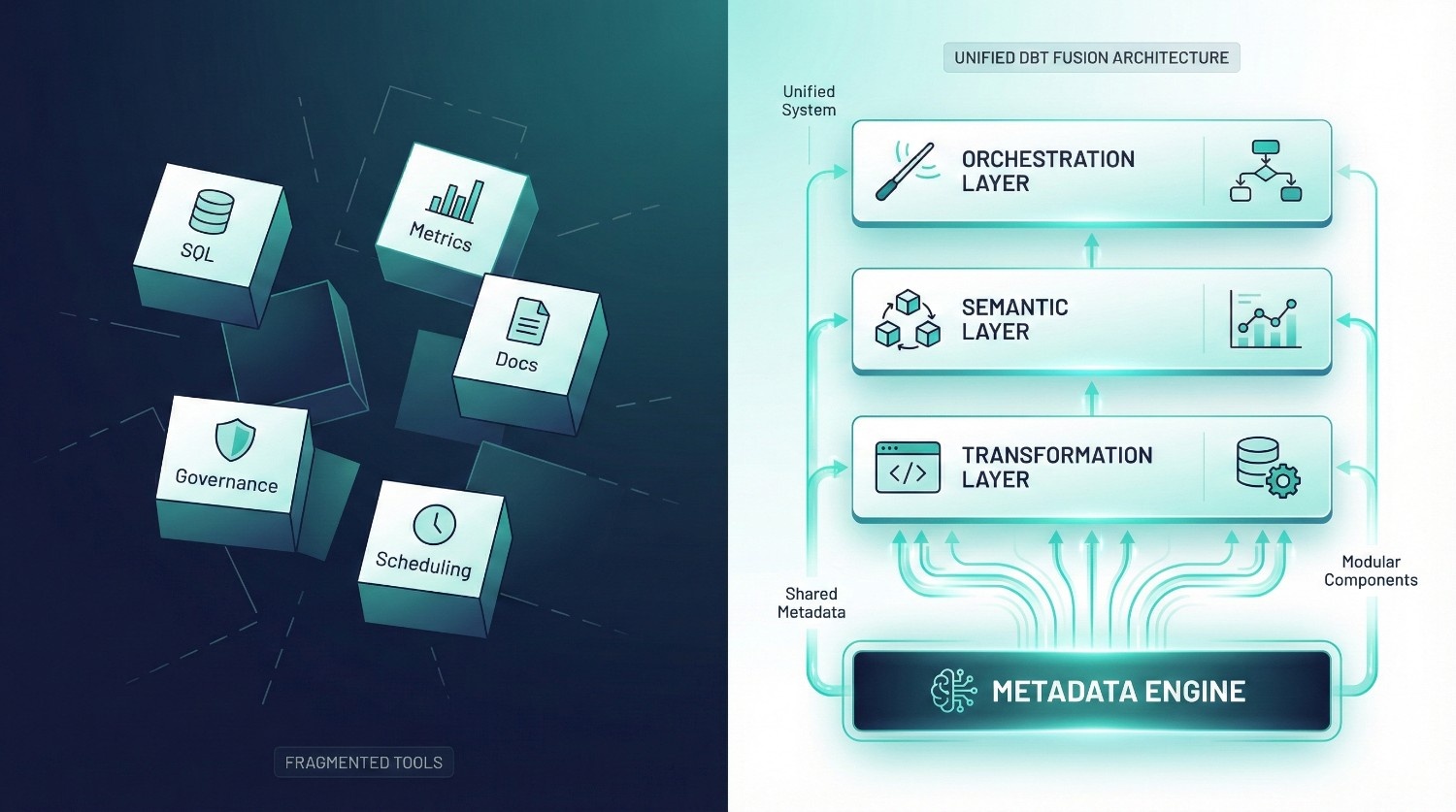
dbt Fusion’s architecture is designed to solve a core problem of the modern data stack:
data teams use too many disconnected tools that don’t share the same logic, governance, or metadata.
Fusion replaces this fragmentation with a unified, modular system built on top of a single metadata backbone.
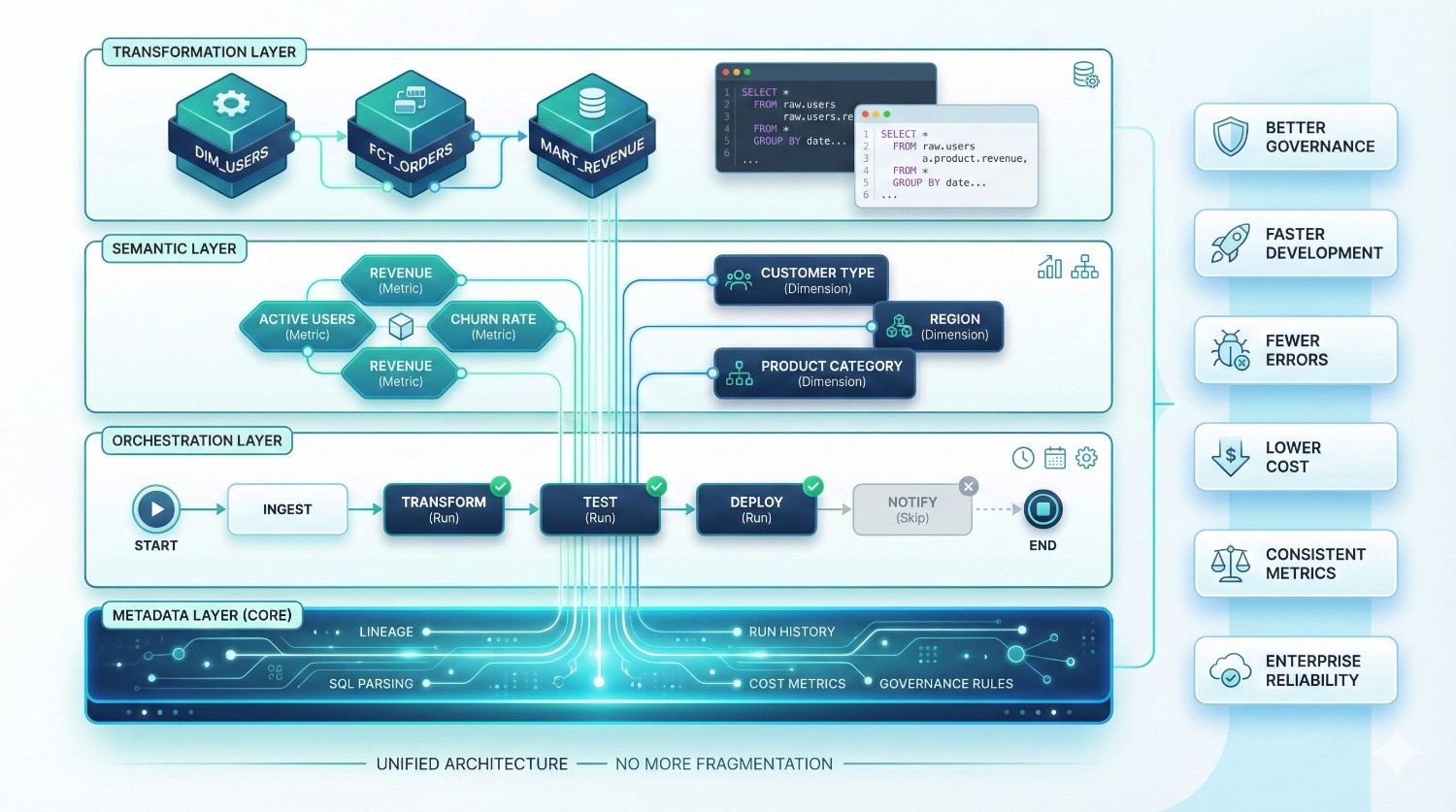
Instead of treating SQL, metrics, documentation, governance, and scheduling as separate layers, dbt Fusion connects them into one coherent architecture.
Fusion is organized into three main layers, all powered by a central metadata engine:
1. Transformation Layer (The Data Modeling Engine)
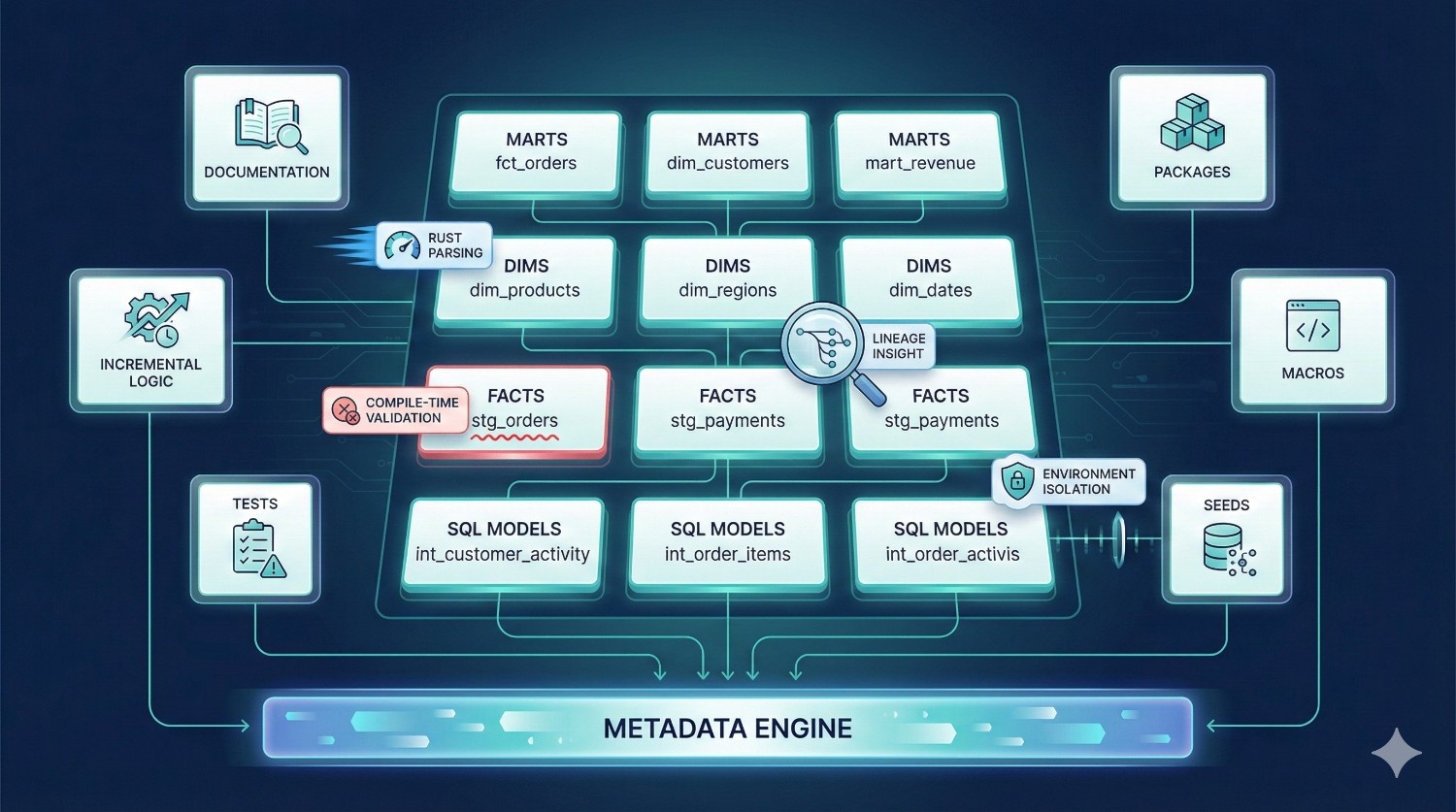
This is the heart of dbt — where your SQL logic lives. In Fusion, the transformation layer includes everything you expect from dbt Core, but with more intelligence and more safety.
Components inside the Transformation Layer:
- Models (select statements, marts, dims, facts)
- Incremental logic (change-only updates, partition-aware)
- Tests (schema + data tests)
- Macros + Jinja templates
- Seed files
- Packages
- Model ownership & documentation
What Fusion adds on top of dbt Core:
- faster parsing via Rust engine
- compile-time validation (catching errors earlier)
- cost-awareness
- lineage-driven decision-making
- impact analysis
- environment isolation
- automatic testing pipelines
Why this matters:
The transformation layer in Fusion isn’t just executing SQL — it’s understanding your project and optimizing how it runs.
This results in:
- fewer broken deployments
- fewer warehouse cost spikes
- faster iteration cycles
- higher developer velocity
The Transformation Layer is where your data modeling lives — but in Fusion, it becomes smarter and safer.
2. Semantic Layer (The Business Logic Brain)
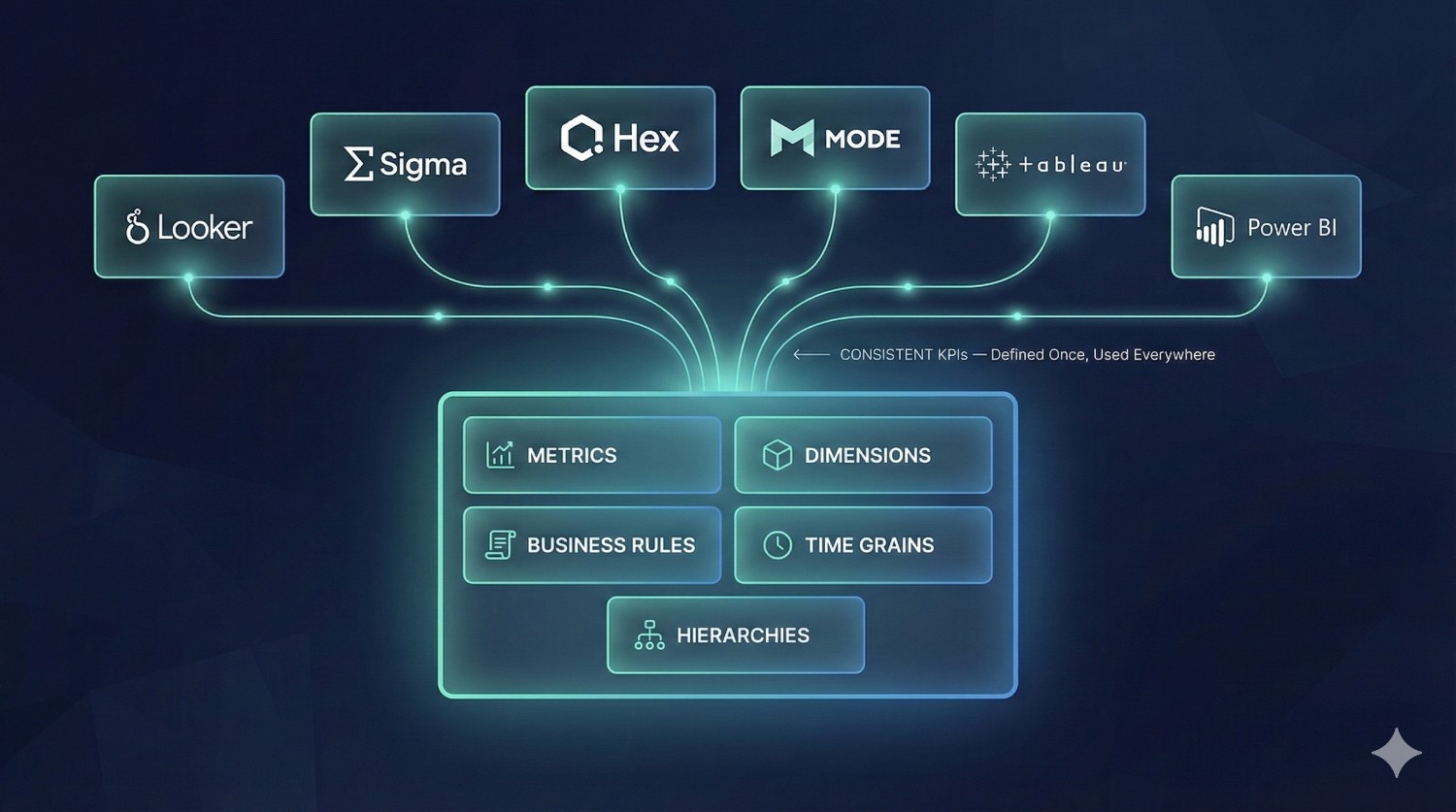
The Semantic Layer is the part of dbt Fusion that standardizes business definitions across your entire organization.
In dbt Core, metrics often get duplicated across:
- Looker
- Tableau
- SQL dashboards
- Stakeholder notebooks
- Individual queries
Fusion solves this by centralizing business definitions.
What the Semantic Layer manages:
- Metrics (e.g., revenue, retention rate, ARPU)
- Dimensions (e.g., region, product category, customer type)
- Hierarchies
- Time-grain logic
- Business rules & KPI logic
- Metric versioning
- Semantic field definitions
Most importantly:
You define your metrics ONCE — and all tools use the same definition.
Supported BI Tools:
- ✔ Looker
- ✔ Sigma
- ✔ Mode
- ✔ Hex
- ✔ Tableau
- ✔ Power BI (via connectors)
Why this matters:
This layer solves one of the oldest problems in analytics:
“Why does the same metric show different results in different dashboards?”
With dbt Fusion, all dashboards, reports, and ad-hoc queries finally match because they all reference the same semantic definitions.
This improves trust, consistency, and governance across the entire business.
3. Orchestration Layer (The Workflow Control Center)
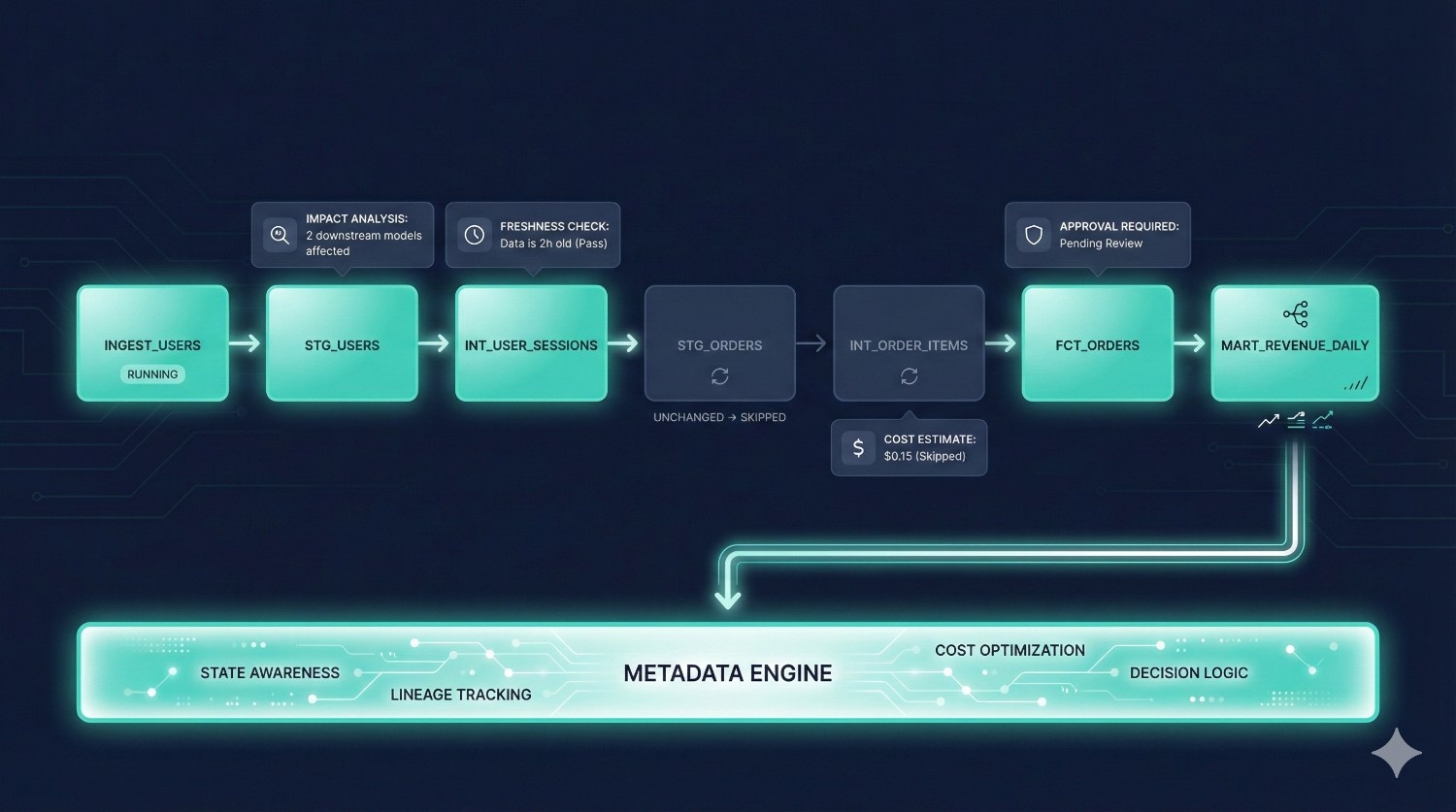
Traditional dbt Core requires additional tools like Airflow, Prefect, or GitHub Actions for scheduling and deployments.
dbt Fusion includes a native orchestration layer built on metadata awareness.
What the Orchestration Layer handles:
- Scheduling (hourly, daily, event-driven)
- Triggers & conditions
- Environment-specific runs
- Automated CI/CD checks
- Approval workflows
- Run-time cost estimation
- Impact analysis
- Selective model runs based on what changed
- Job monitoring & logging
Why metadata-aware orchestration is powerful:
Because it understands:
- dependencies
- lineage
- semantic relationships
- costs
- environment context
- upstream freshness
Fusion can decide:
- what needs to run
- what can be skipped
- what will break
- what will be expensive
- whether downstream dashboards will be affected
The result is fewer runs, lower costs, fewer failures, and cleaner deployments.
The Metadata Layer (The Core of Everything)
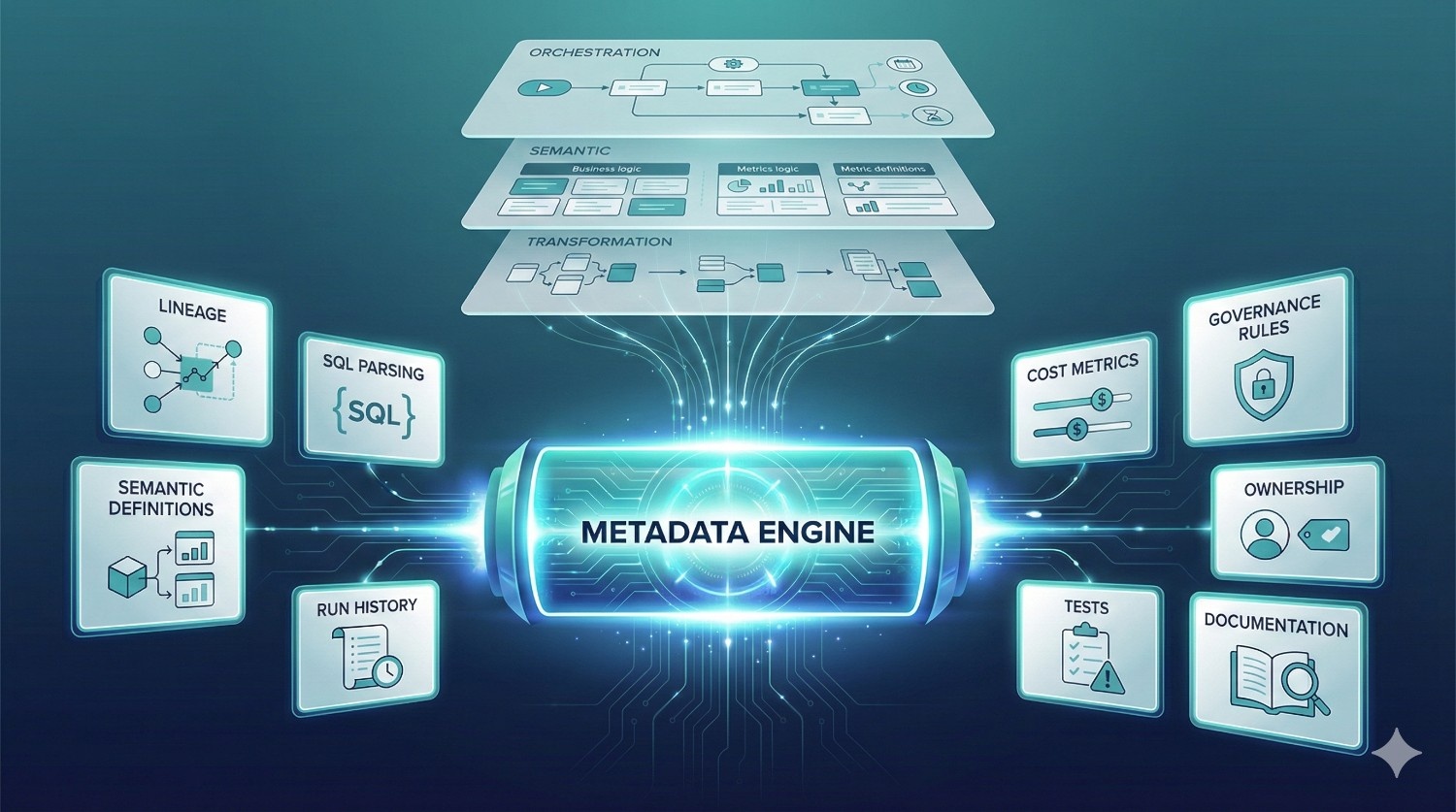
All three layers — Transformation, Semantic, Orchestration — rely on Fusion’s central metadata engine.
This metadata layer includes:
- model structures
- SQL parsing results
- lineage graphs
- semantic definitions
- cost metrics
- historical run data
- data tests
- documentation
- ownership
- governance rules
Why the metadata layer matters:
Metadata enables dbt Fusion to:
- validate SQL before running
- prevent breaking changes
- estimate warehouse cost
- optimize incremental logic
- track downstream impact
- generate lineage automatically
- enforce governance
- understand which dashboards rely on which models
- coordinate multi-environment deployments
This single source of truth transforms dbt from a modeling tool into an intelligent analytics engineering platform
Summary: Fusion’s Architecture at a Glance
|
Layer
|
Purpose
|
What Fusion Adds
|
|---|---|---|
|
Transformation Layer
|
Transform raw → modeled data
|
Rust engine, cost intelligence, compile-time validation
|
|
Semantic Layer
|
Standardize business metrics & logic
|
Universal metrics, BI integrations, versioning
|
|
Orchestration Layer
|
Schedule, deploy, validate runs
|
Metadata-aware DAG execution, approvals, impact analysis
|
|
Metadata Layer (Core)
|
Connect everything together
|
Lineage, governance, cost models, dependencies
|
Everything works together — seamlessly.
Fusion’s architecture is what allows:
- better governance
- faster development
- fewer errors
- lower warehouse cost
- consistent metrics
- enterprise-level reliability
No more duct-taping different tools.
No more inconsistencies.
No more guesswork.
dbt Fusion provides a single, unified architecture for modern analytics engineering.
dbt Fusion Use Cases
dbt Fusion isn’t just “dbt Core plus extra features.”
It directly addresses real-world challenges that modern data teams struggle with as they scale.
Below are the most impactful use cases where dbt Fusion shines:
1. Enterprise-Level Data Governance
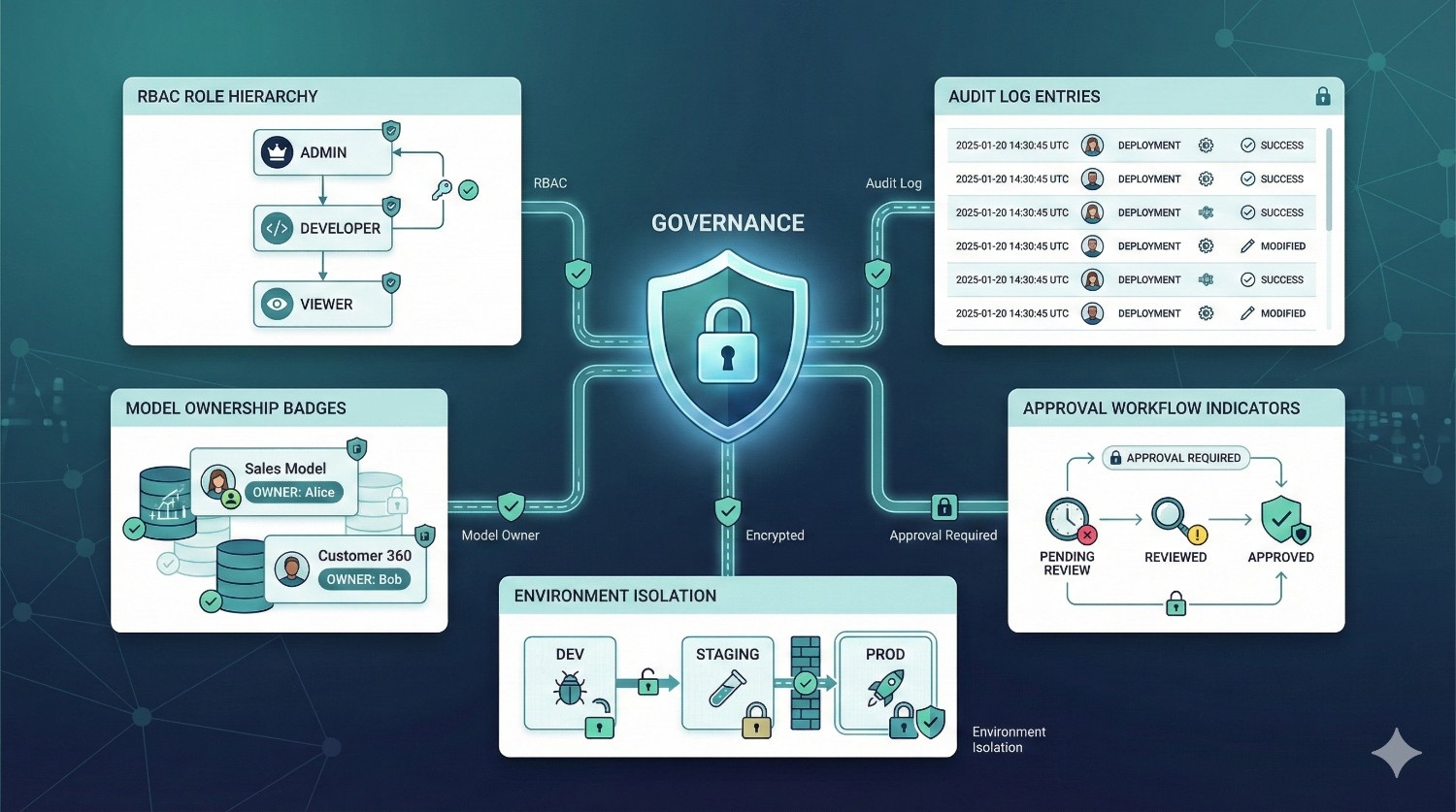
Large organizations deal with:
- multiple analytics teams
- hundreds of models
- strict compliance requirements
- conflicting definitions of KPIs
- massive pressure to avoid production failures
dbt Fusion introduces a unified system for:
✔ Consistent Metric Definitions
Using the semantic layer, metrics like Revenue, Retention, CAC, or Gross Margin are defined once — and used everywhere.
No more conflicting dashboards.
✔ End-to-End Lineage
Fusion automatically maps every upstream and downstream relationship:
- raw → staging → marts
- models → dashboards
- metrics → BI queries
This provides instant visibility into how data flows through the organization.
✔ Role-Based Access (RBAC)
Limit who can:
- change models
- deploy to production
- approve PRs
- edit semantic definitions
- modify environments
Perfect for teams with different roles (analysts, engineers, BI devs, auditors).
✔ Auditability
Fusion logs:
- who made a change
- what changed
- when
- where it was deployed
- who approved it
This is essential for industries with compliance requirements (HIPAA, SOX, PCI, GDPR).
Best suited for:
Finance, healthcare, insurance, mobility, logistics, banking, and any org with strict compliance or large model surface area.
2. Real-Time & Near Real-Time Analytics
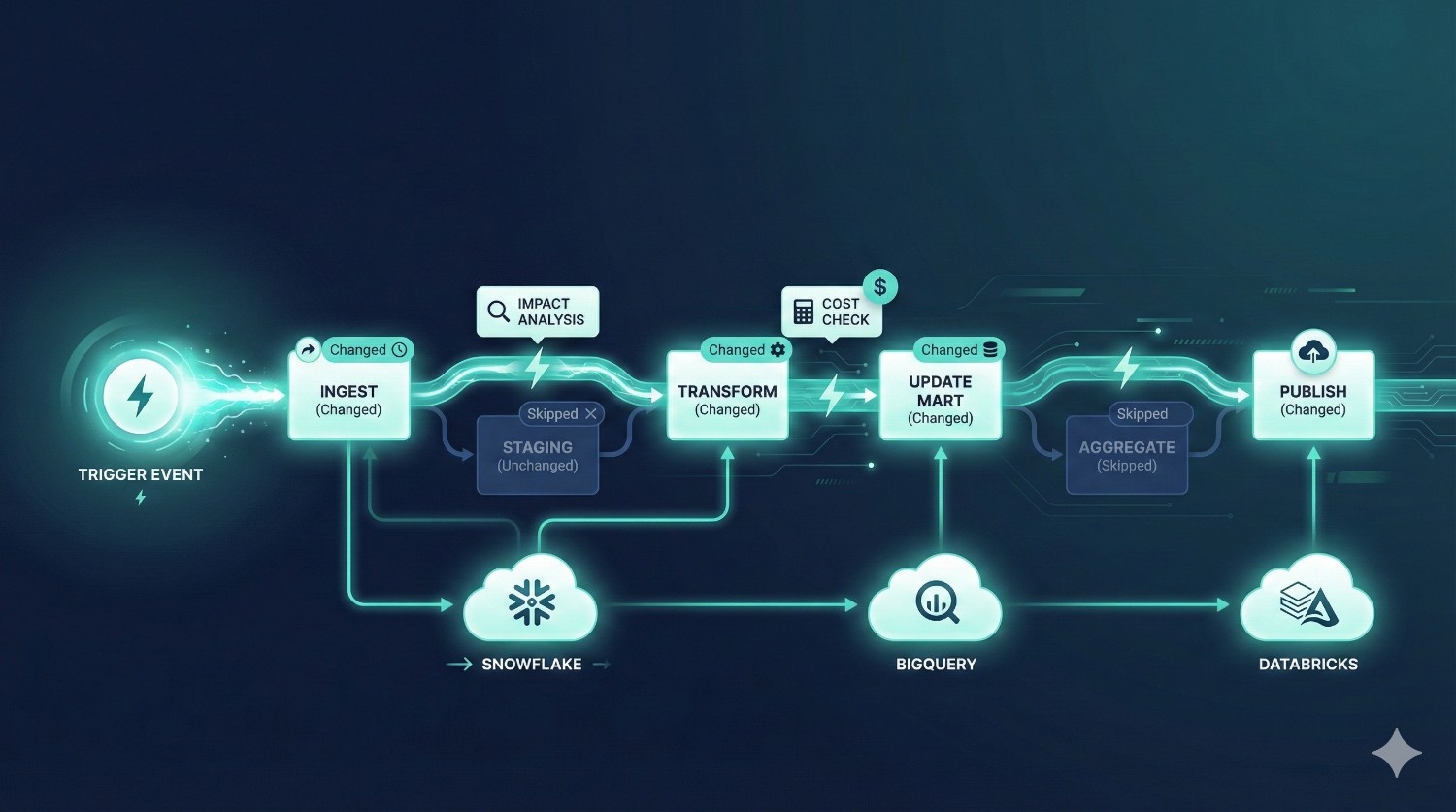
Traditional dbt runs depend on schedules like hourly or daily.
But modern businesses often need event-driven pipelines such as:
- “refresh dashboards whenever new data lands”
- “update metrics when orders are created”
- “rebuild only the changed parts of the DAG”
Fusion enables intelligent scheduling through:
✔ Metadata-aware orchestration
Fusion knows:
- what’s changed
- what needs to run
- what can be skipped
- what would be expensive
- what will break downstream
This allows teams to run pipelines as soon as data arrives — without rebuilding the entire DAG and wasting warehouse credits.
✔ Cloud warehouse compute alignment
Snowflake, BigQuery, and Databricks excel at handling micro-batch or incremental transformations.
Fusion plugs into that compute model seamlessly.
Best suited for:
Companies building operational analytics, real-time dashboards, product analytics, or ML feature pipelines.
3. Multi-Team Collaboration (Large Data Orgs)
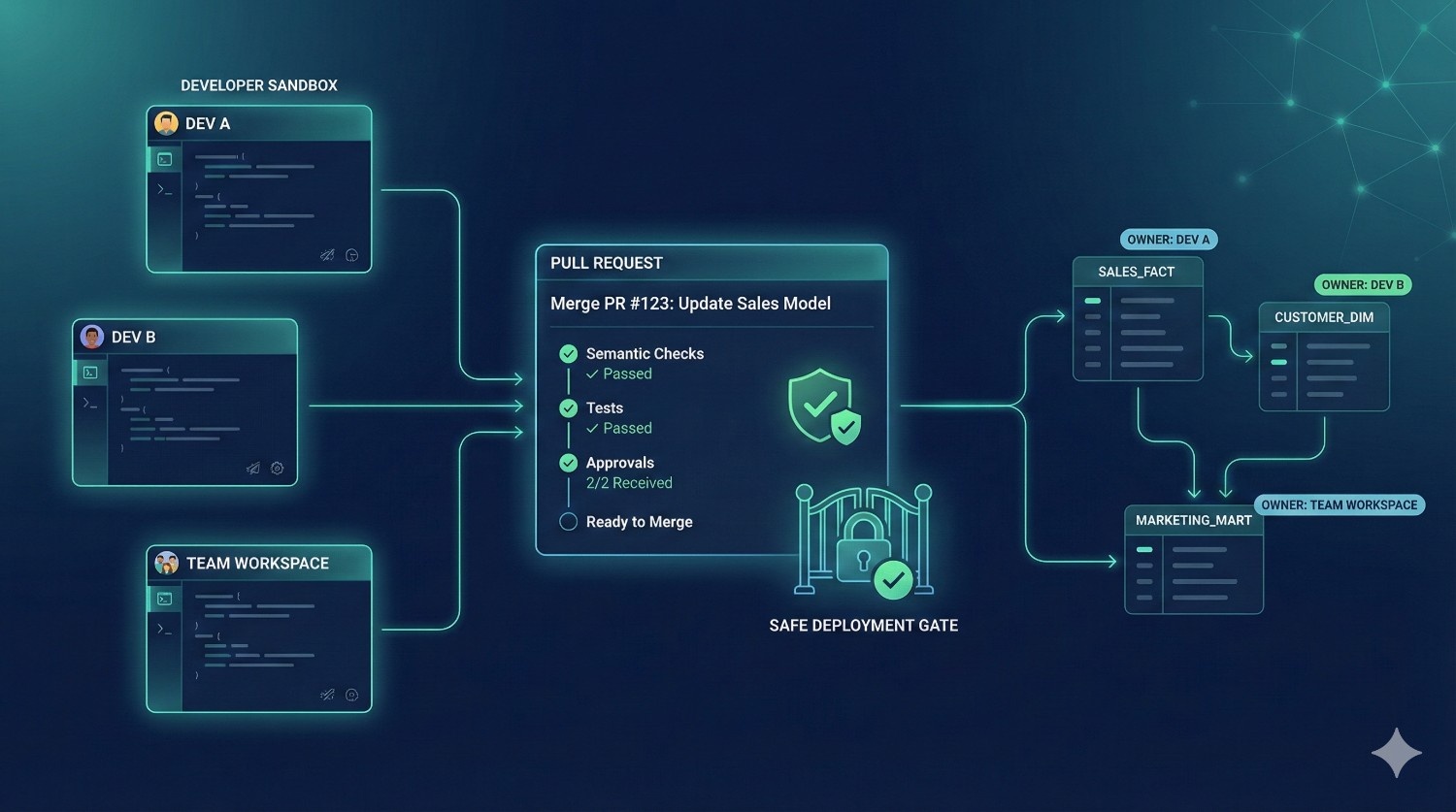
As teams grow beyond 5–10 contributors, dbt Core workflows quickly break down:
- developers step on each other’s changes
- dev environments drift
- PR approvals become chaotic
- deployments impact multiple teams
- it becomes unclear who owns which model
- semantic drift between teams becomes common
dbt Fusion solves this through:
✔ Isolated Development Environments
Each developer or team gets their own sandbox:
- no accidental overwrites
- no shared-state bugs
- safer experimentation
✔ Structured Approval Workflows
PRs can require:
- tests passing
- approvals
- semantic checks
- impact analysis
- role-based permissions
✔ Model Ownership
Every model has a defined owner.
Fusion can show:
- who is responsible
- who reviews changes
- who gets alerted when something breaks
✔ Production Guardrails
Fusion ensures only approved, reviewed code reaches production.
Best suited for:
Analytics teams with:
- 20–200+ active contributors
- multiple domains (marketing, product, finance, ops)
- complex DAGs
- distributed teams across time zones
4. Self-Service BI Enablement
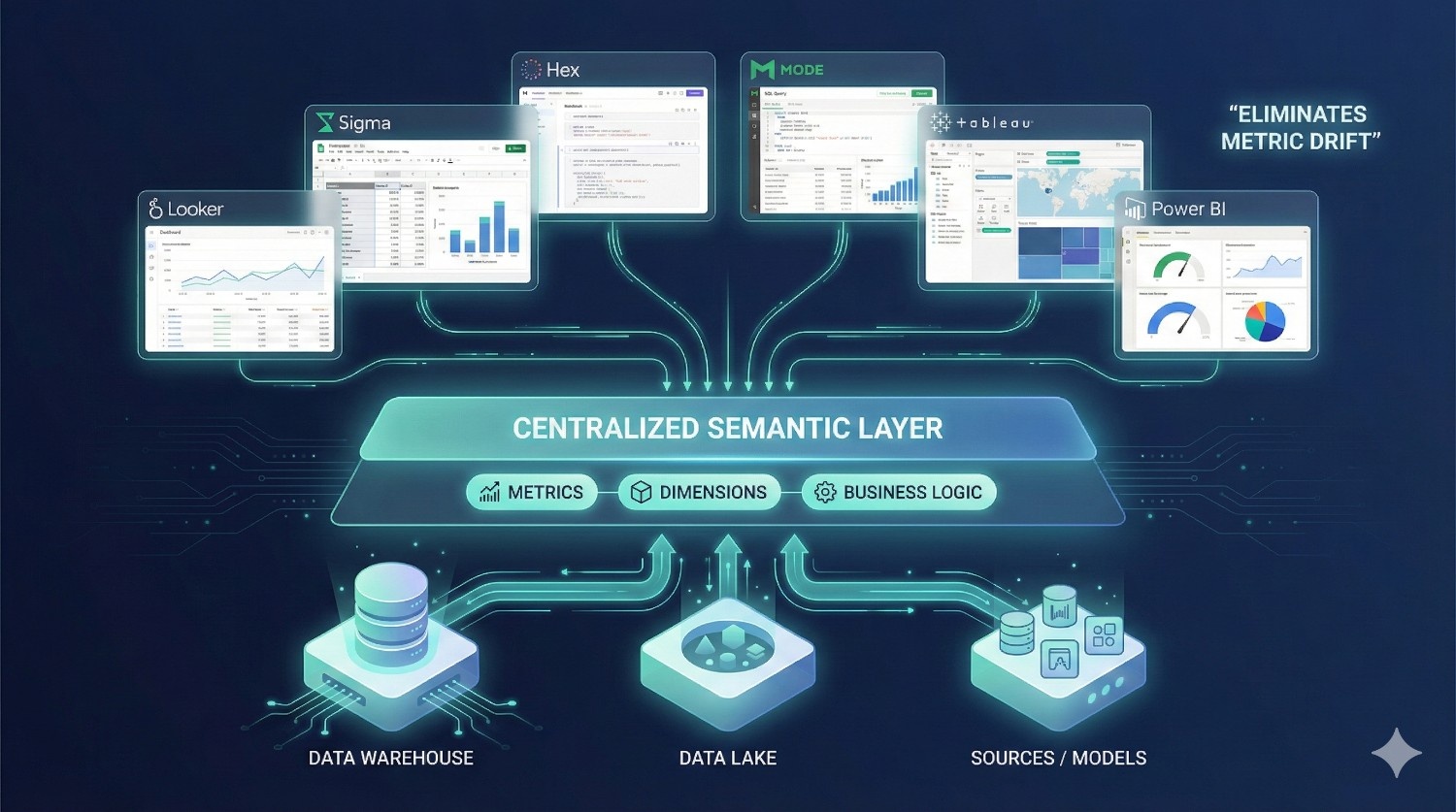
One of dbt Fusion’s biggest value drivers is its semantic layer.
This enables:
✔ Governed Metrics in BI Tools
Define once in dbt → available everywhere:
- Looker
- Sigma
- Tableau
- Power BI
- Hex
- Mode
✔ No More Metric Drift
If Revenue = X in dbt, it will equal X in all dashboards.
No more:
- “Finance says revenue is $4.2M”
- “Marketing says revenue is $3.9M”
- “BI dashboard shows another number”
✔ Faster Reporting
Analysts no longer rewrite SQL for every question.
They simply reference the governed metrics.
✔ Trusted Dashboards
Once metrics are standardized, trust increases across leadership and stakeholders.
Best suited for:
Orgs with large BI teams, multiple dashboards, or inconsistent KPIs across tools.
Benefits of dbt Fusion for Organizations
dbt Fusion isn’t just an improved development experience — it fundamentally reshapes how data teams build, operate, and scale analytics pipelines.
Below are the key organization-wide benefits, explained in depth.
1. Faster Development & Shorter Iteration Cycles
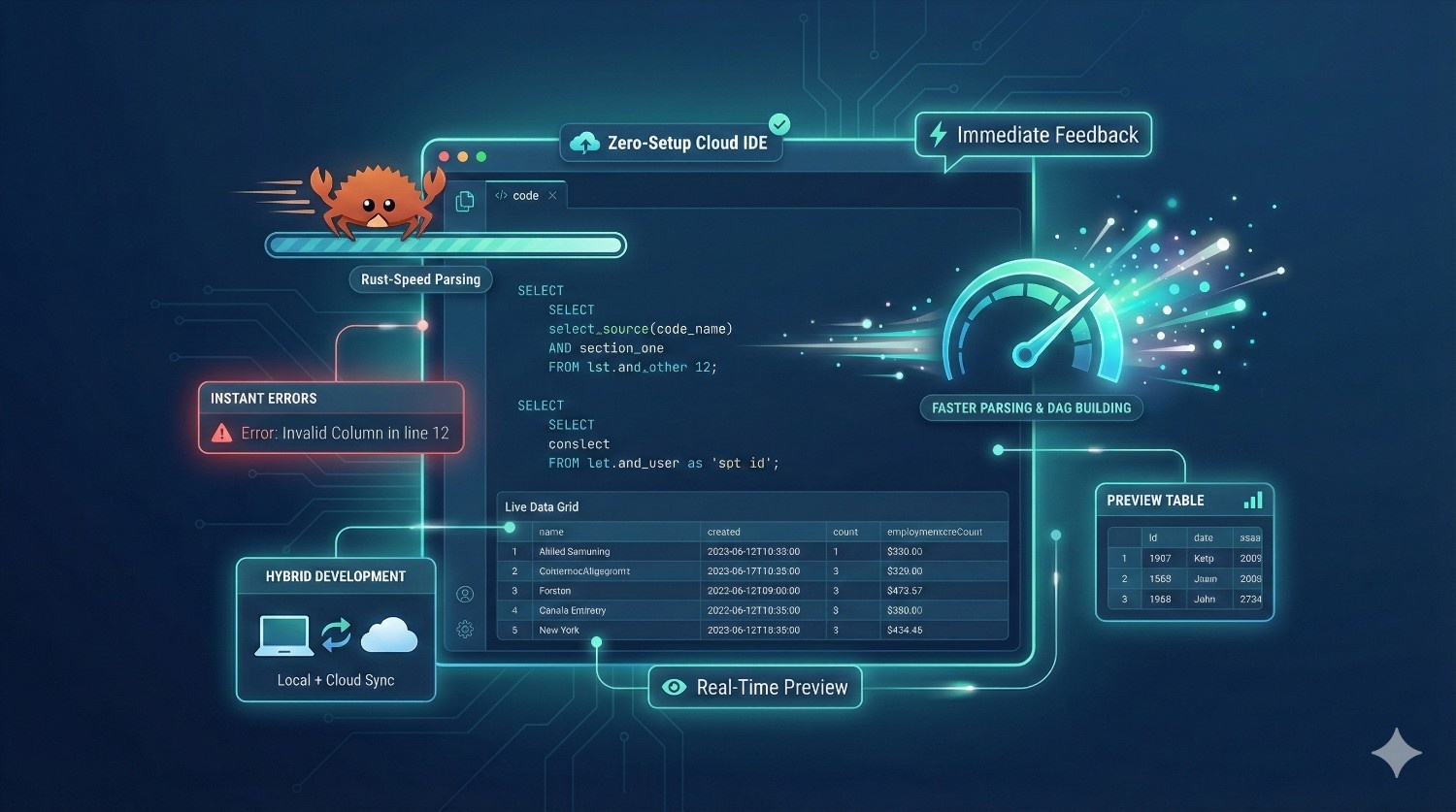
One of the largest hidden costs in analytics engineering is slow development:
- running a model takes minutes
- debugging takes even longer
- waiting for full DAG rebuilds slows down productivity
- onboarding new contributors takes days
dbt Fusion solves this through:
✔ Lightning-Fast Rust Engine
The new Fusion engine parses models and builds the DAG much faster than Python.
✔ Immediate SQL Feedback
Developers get warnings and errors as they type, not after a run.
✔ Real-Time Previews
You can preview model output instantly, using real warehouse data.
✔ Hybrid IDE
Develop locally or use the cloud IDE with zero setup.
Result:
Developers ship changes in hours instead of days, and the entire engineering cycle becomes smoother and more enjoyable.
2. Fewer Production Failures (Safer Deployments)
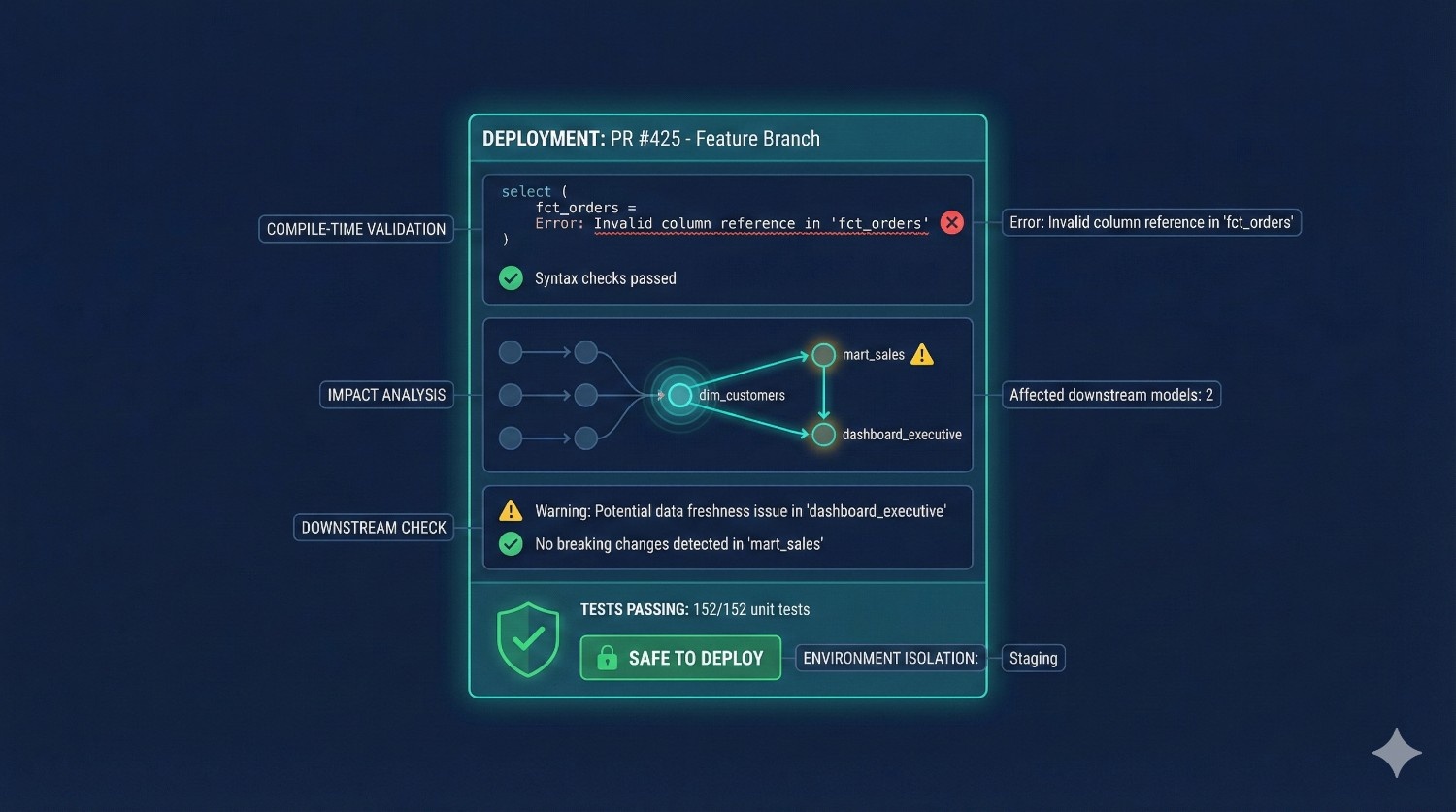
In dbt Core, many issues only surface during execution:
- broken SQL
- missing columns
- invalid references
- schema drift
- upstream changes
- unintentional full table scans
dbt Fusion dramatically reduces failures with:
✔ Compile-Time Validation
Fusion detects errors before the model even runs.
✔ Dependency-Aware Warnings
You’re notified if a change will break downstream models.
✔ Metadata-Driven Impact Analysis
Fusion shows exactly what will change, what dashboards will be affected, and how much compute the change may cost.
✔ Isolated Environments
Developers can test safely without touching production.
Result:
Teams spend less time firefighting and more time building.
3. Consistent Metric Logic Across the Entire Organization
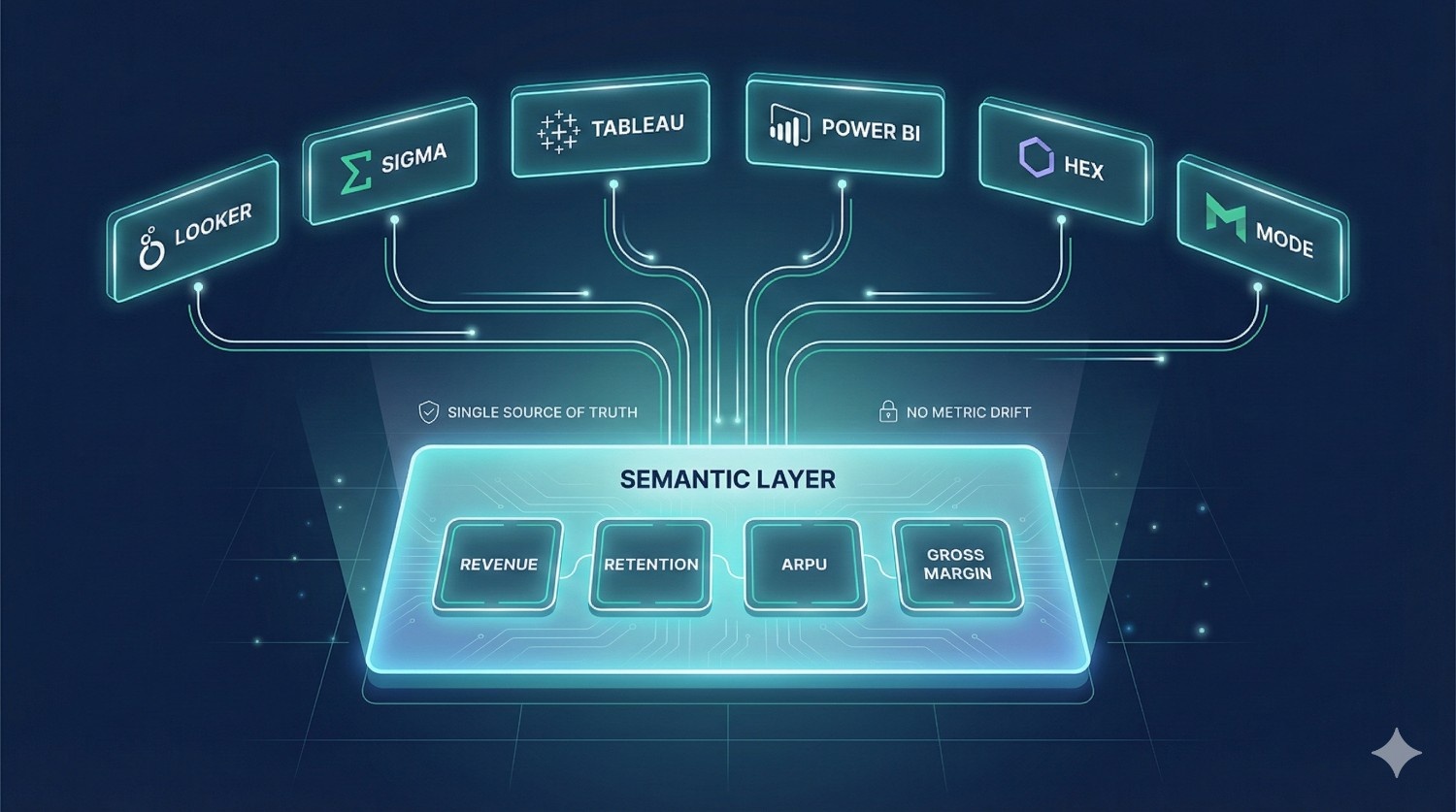
Most organizations suffer from “metric drift” — the same KPI showing different numbers across tools.
dbt Fusion’s semantic layer solves this by centralizing:
- metrics
- dimensions
- definitions
- business rules
Once defined in dbt Fusion, a metric becomes reusable across:
- Looker
- Sigma
- Tableau
- Hex
- Power BI
- Mode
✔ Define your business metrics once
✔ Use them everywhere
✔ Guarantee consistency across dashboards
This is one of the biggest benefits of Fusion, especially for leadership and BI teams.
4. Reduced Tooling Sprawl (Less Complexity, Lower Cost)
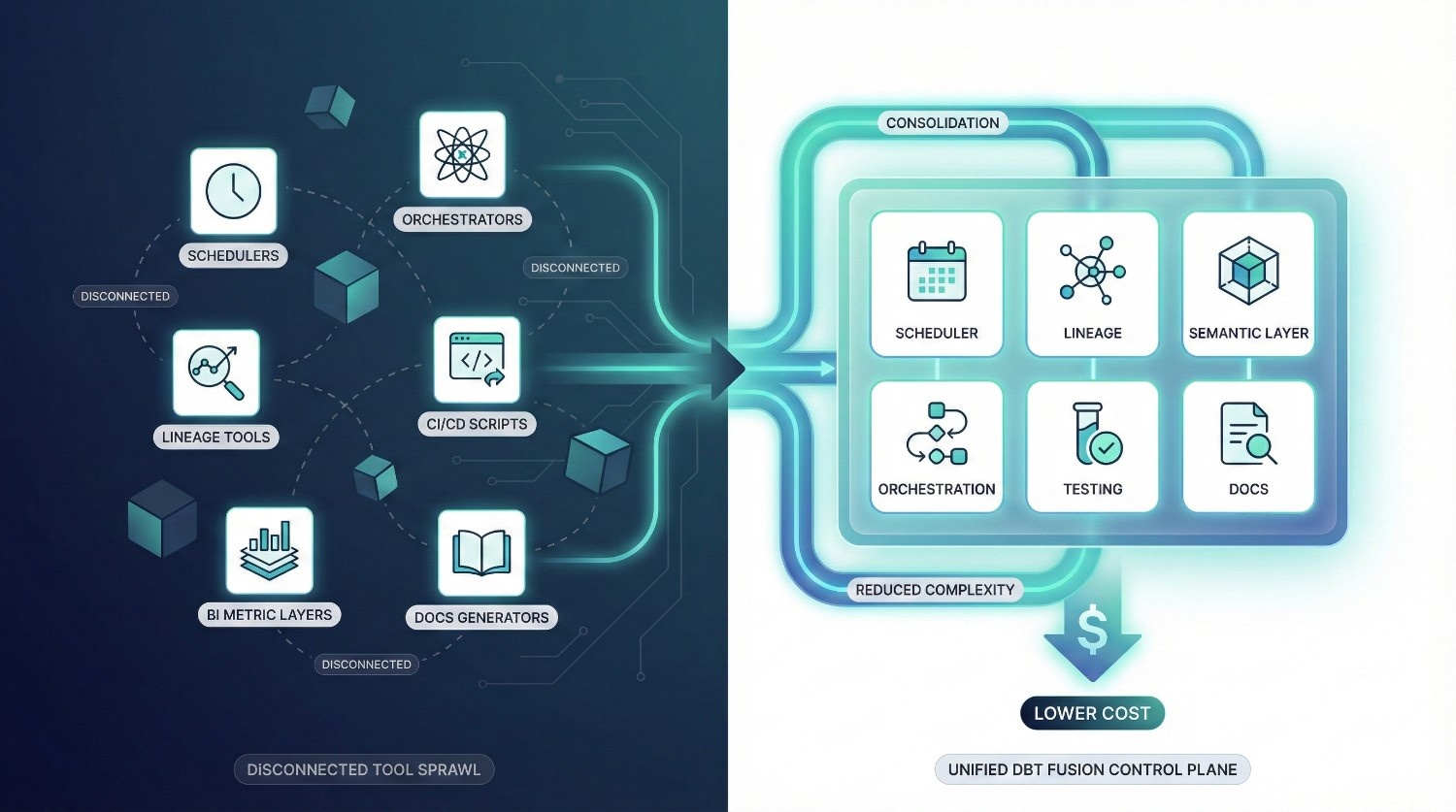
Without dbt Fusion, teams often rely on:
- a scheduler
- a separate orchestrator (Airflow/Prefect)
- a lineage platform (e.g., Monte Carlo, Atlan)
- a metric layer (LookML or proprietary logic)
- CI/CD tools
- semantic modeling tools
- documentation generators
dbt Fusion replaces many of these with native capabilities:
✔ Native scheduler
✔ Metadata-aware orchestrator
✔ Built-in lineage
✔ Universal semantic layer
✔ Version-controlled documentation
✔ Integrated testing
Result:
- fewer tools to maintain
- lower platform cost
- simpler architecture
- faster troubleshooting
- less training required for new hires
dbt Fusion becomes the central control plane for the modern data stack.
5. Improved Cross-Team Alignment
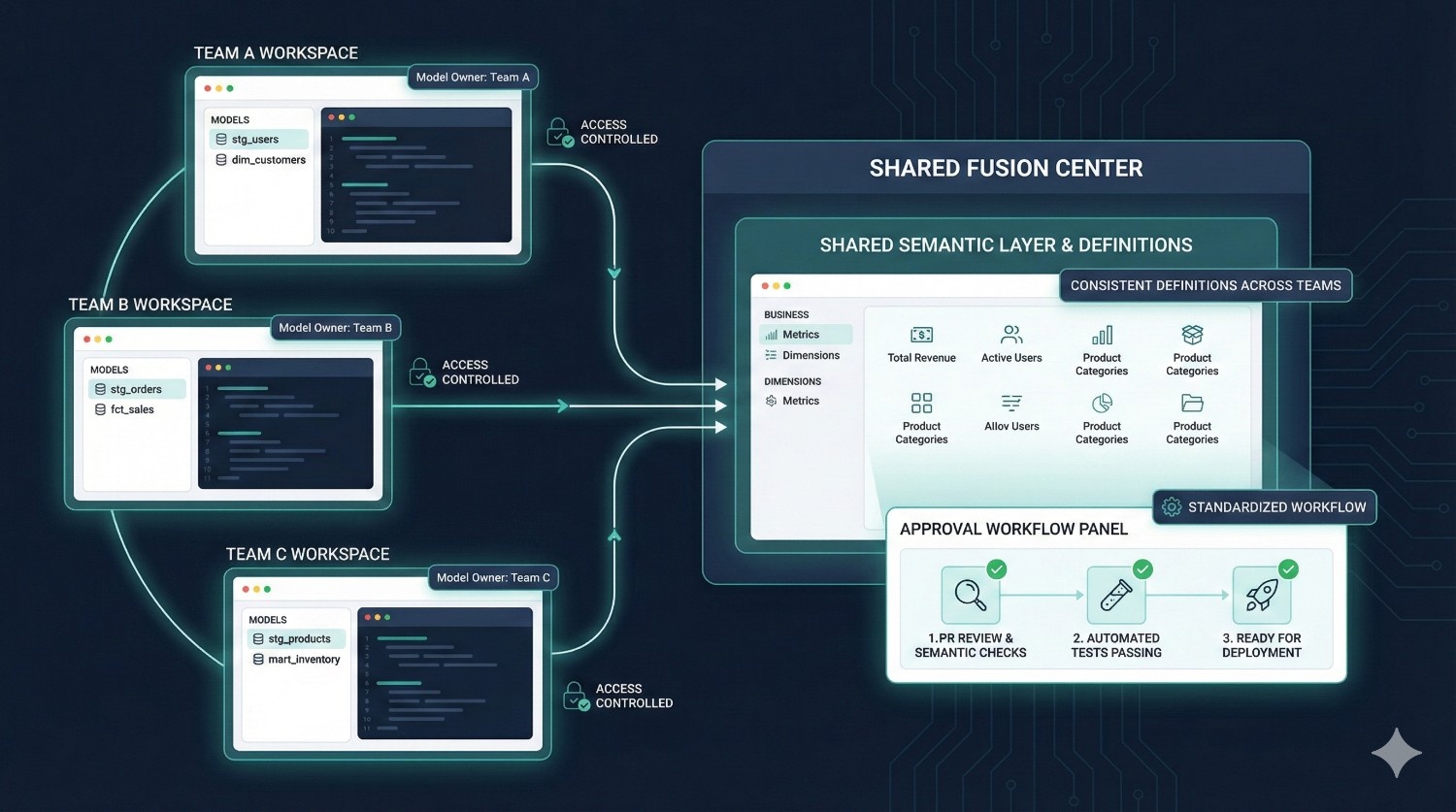
Organizations with multiple analytics teams often struggle with:
- different modeling standards
- inconsistent definitions
- conflicting SQL styles
- duplicated logic
- unclear ownership
- difficulty reviewing changes
Fusion addresses this with:
✔ Model Ownership
Every asset (model, metric, test) has a defined owner.
✔ Access Controls
Teams only modify what they are responsible for.
✔ Environment Isolation
Prevent accidental overwrites or cross-team interference.
✔ Standardized Development Workflow
Everyone follows the same Git-native approach.
✔ Shared Semantic Layer
BI, engineering, and analytics finally use the same definitions.
Result:
Clear alignment, predictable workflows, and fewer conflicts between teams.
Is dbt Fusion Right for You?
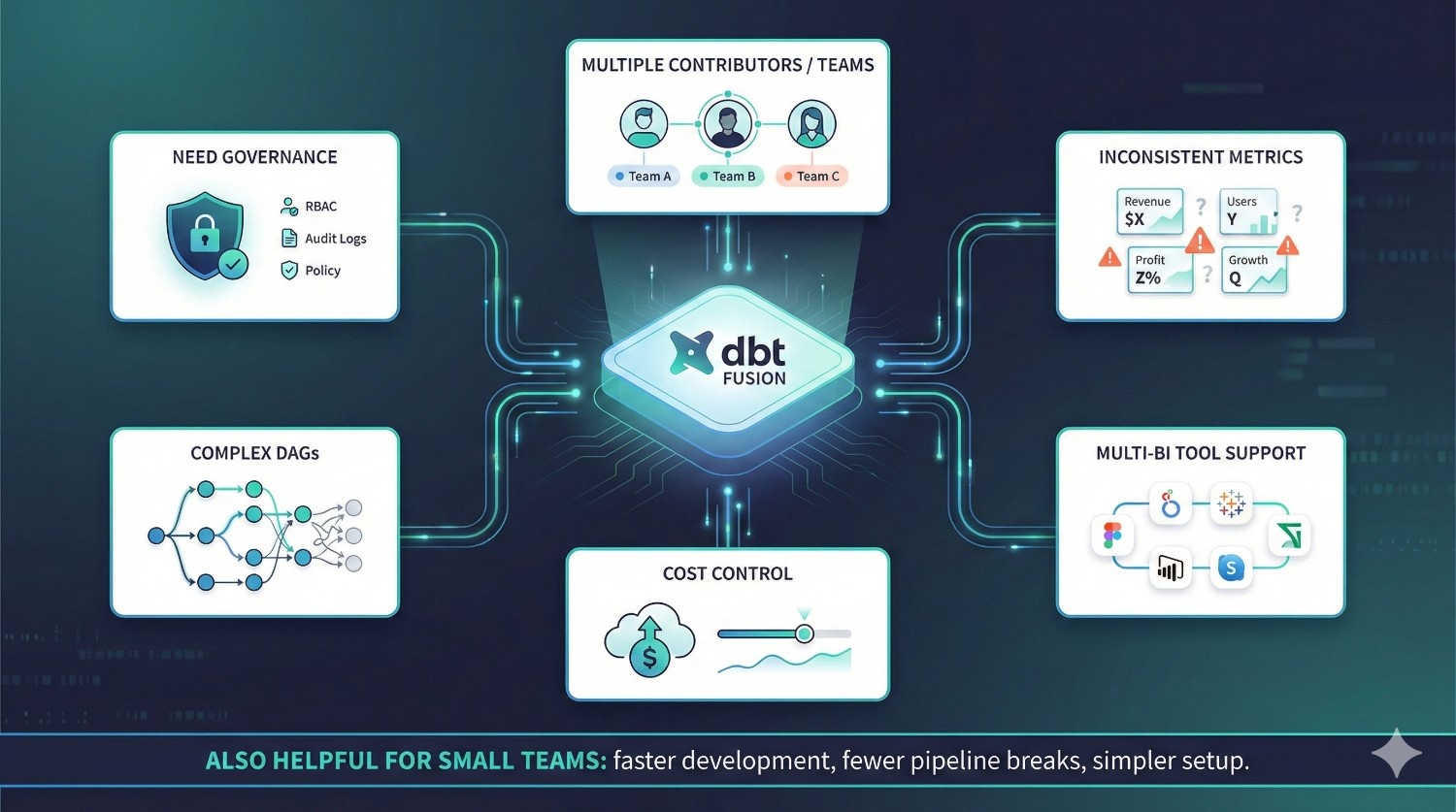
dbt Fusion is not just for large enterprises — it’s for any team that wants cleaner, faster, safer, and more scalable analytics development.
Below is a clear guide to help you understand whether Fusion is a good fit.
dbt Fusion is ideal for teams that:
1. Have multiple contributors or multiple analytics teams
If more than 3–5 people work on your dbt project, Fusion prevents:
- merge conflicts
- dev environment drift
- ownership confusion
- model overwrites
2. Struggle with inconsistent metrics
If different dashboards show different numbers for the same KPI, the semantic layer fixes that permanently.
3. Need strong data governance
Fusion’s built-in governance (RBAC, audit logs, approvals) is perfect for:
- finance
- healthcare
- banking
- insurance
- mobility
- logistics
- regulated industries
4. Manage complex DAGs or pipelines
If your DAG has dozens or hundreds of models, the Rust engine provides:
- faster parsing
- clearer lineage
- better incremental logic
- safer deployments
5. Support multiple BI tools
If you use Looker + Tableau + Sigma, Fusion ensures consistent logic across all tools.
6. Want better control over warehouse cost
Fusion’s cost-aware engine helps avoid:
- accidental full table scans
- expensive incremental rebuilds
- cascading rebuilds across the DAG
Especially valuable for Snowflake and BigQuery users.
Even small teams benefit from dbt Fusion
Fusion is often seen as an enterprise platform, but even small teams gain:
- faster development
- simpler setup
- fewer broken pipelines
- less DevOps overhead
- universal metric definitions
If you value reliability, speed, and clarity — Fusion is worth adopting regardless of team size.
How DataPrism Helps You Implement dbt Fusion
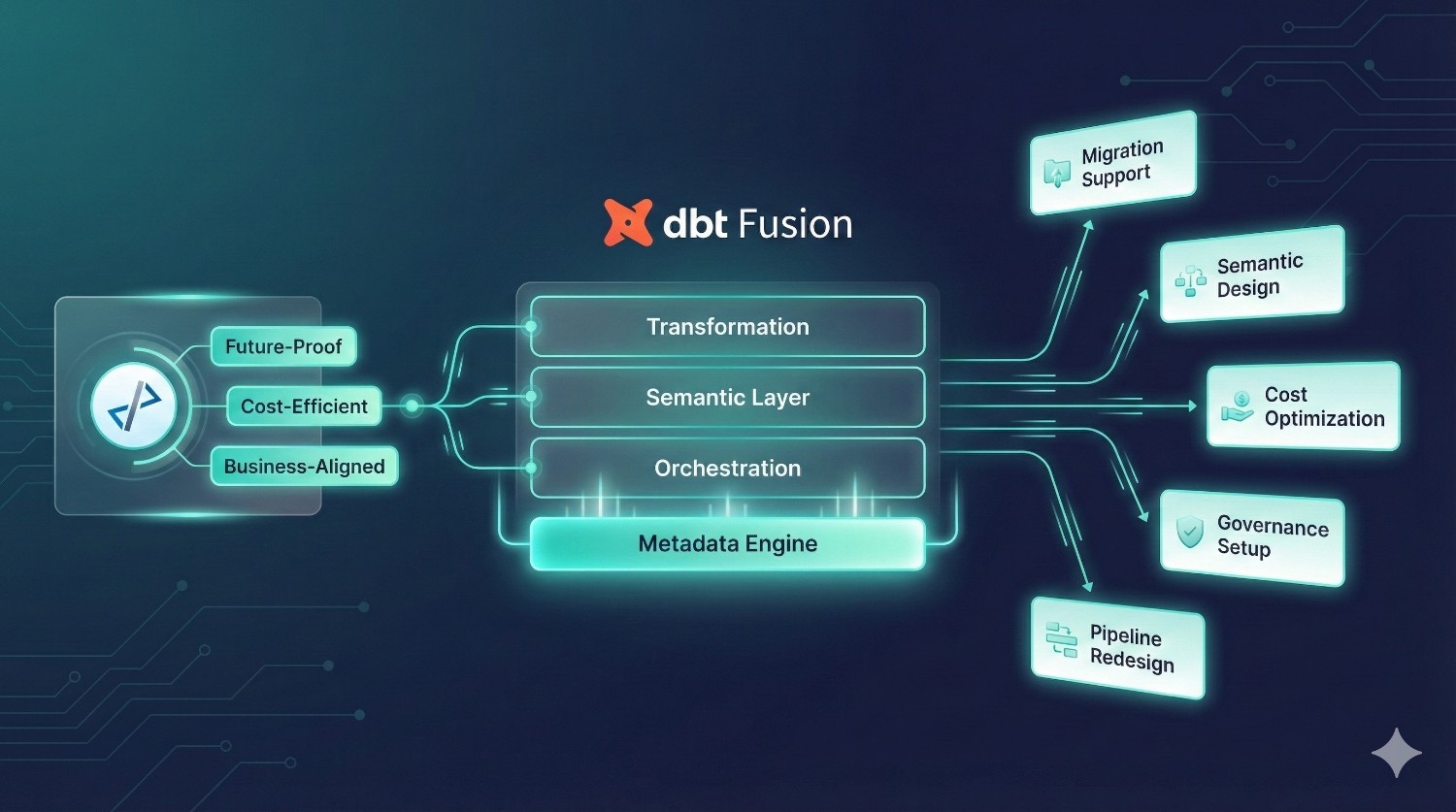
dbt Fusion introduces a completely new way of modeling, governing, and orchestrating analytics—but adopting it successfully requires more than just switching tools.
It requires the right architecture, testing strategy, semantic definitions, and warehouse optimization patterns.
This is where DataPrism comes in.
DataPrism works with fast-growing startups and established enterprises to help them adopt dbt Fusion smoothly, safely, and strategically.
Our engineering-led implementation approach ensures that every Fusion rollout is:
- future-proof
- cost-efficient
- aligned with business goals
- optimized for analytics and BI teams
Here’s how we help:
1. Seamless Migration from dbt Core → dbt Fusion
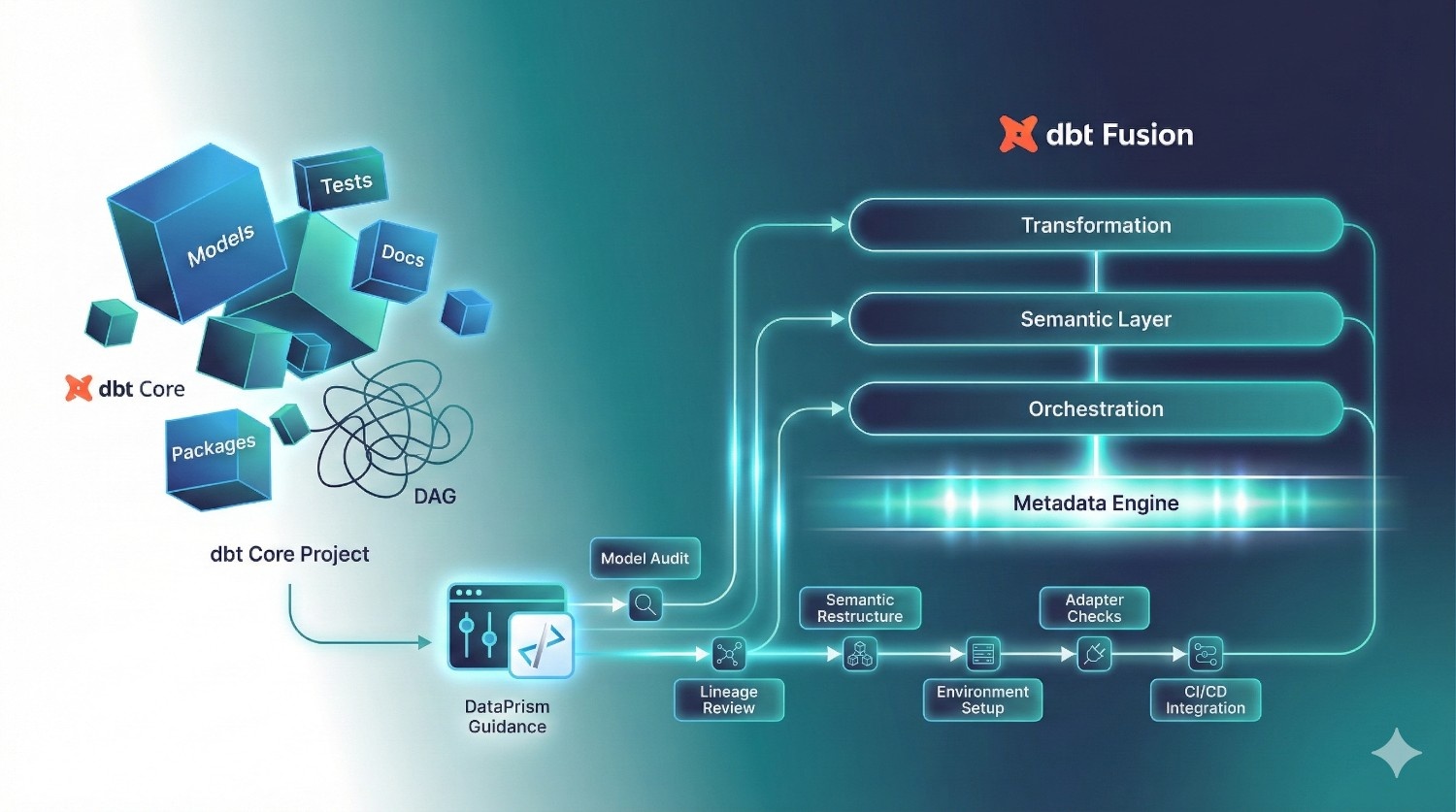
Migrating an existing dbt Core project into Fusion requires:
- model validation
- semantic layer restructuring
- multi-environment setup
- Git workflow alignment
- dependency and lineage review
- adapter checks (Snowflake, BigQuery, etc.)
- cost-aware incremental logic updates
DataPrism handles the entire process:
- audit your existing dbt project
- resolve incompatibilities
- reorganize models into Fusion-ready structures
- set up dev → staging → production environments
- configure Fusion’s Rust engine and CI/CD
- validate runs and ensure zero-breaking-change deployment
You get a clean, optimized, Fusion-ready project without the migration headaches.
2. Semantic Layer Design & Metric Standardization
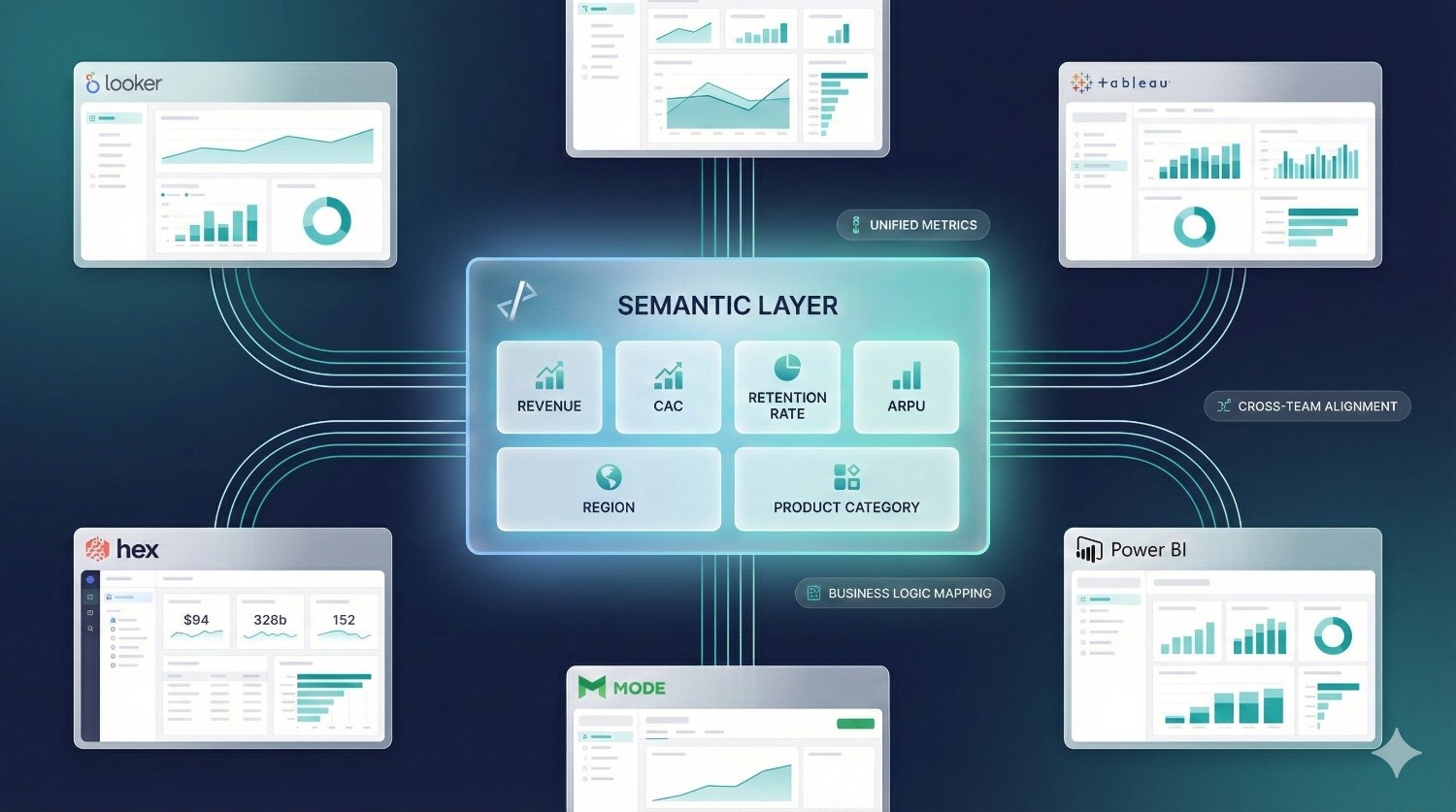
Most teams struggle with inconsistent KPI definitions across BI tools.
Fusion’s semantic layer solves this — but only if it’s designed correctly.
DataPrism helps you:
- define metrics, dimensions, and hierarchies
- map business logic to semantic entities
- align definitions across finance, product, marketing, and BI
- integrate metrics into Looker, Sigma, Hex, Tableau, and Mode
- establish long-term governance around changes
This ensures one source of truth across the company.
3. Warehouse Cost Optimization (Snowflake, BigQuery, Redshift)
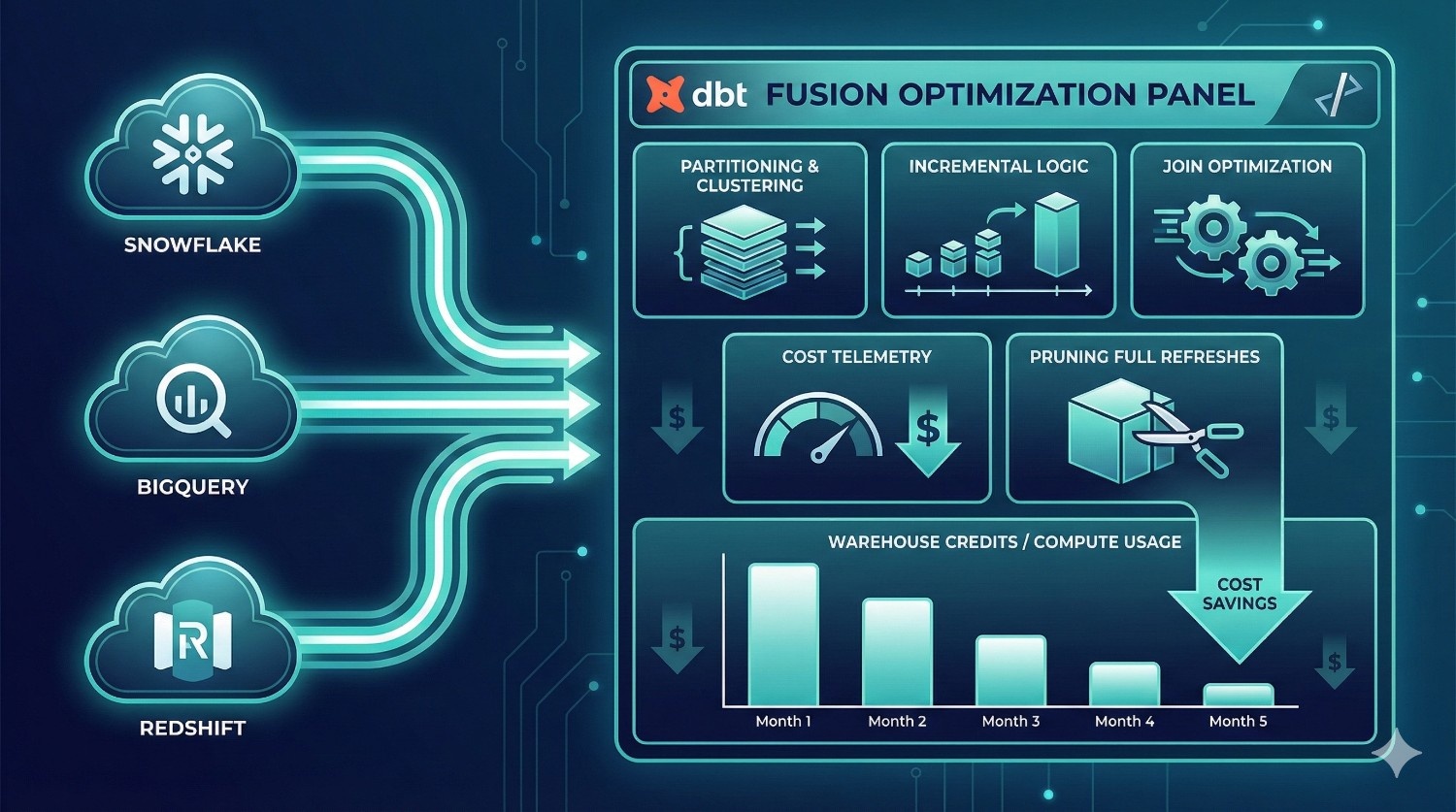
Fusion introduces cost awareness, but optimizing cost still requires expertise such as:
- partitioning & clustering strategy
- incremental model re-design
- pruning unnecessary full refreshes
- identifying expensive joins
- optimizing data types & materialization strategies
- improving BigQuery partition pruning
- reducing Snowflake warehouse credit burn
DataPrism engineers use Fusion’s metadata + warehouse telemetry to create a cost-efficient model architecture, saving you money every month.
4. CI/CD & Governance Setup for dbt Fusion
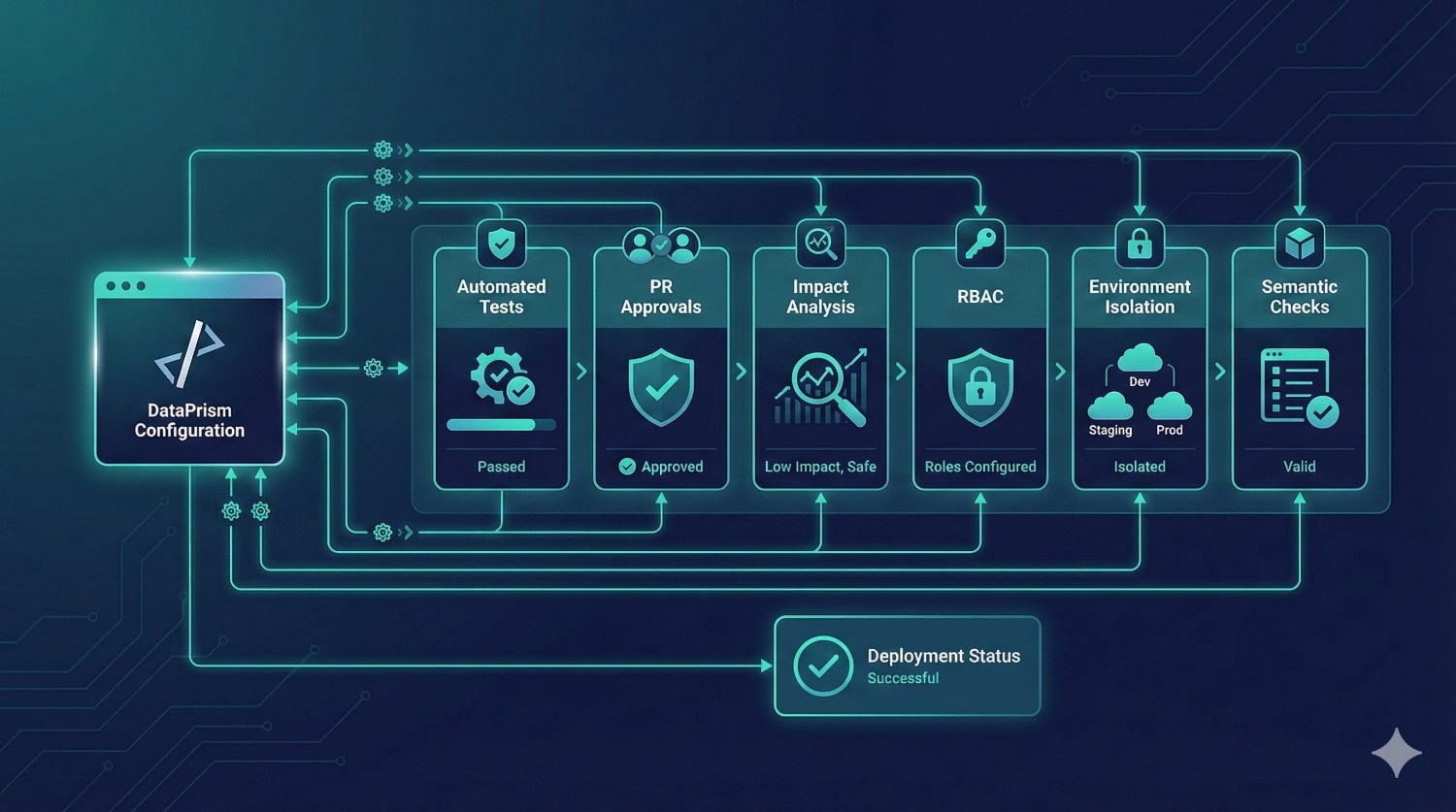
Fusion’s native orchestration is powerful, but requires correct configuration:
- automated testing
- PR approvals
- environment isolation
- RBAC setup
- SSO & team permissions
- schedule & trigger design
- impact analysis gating
- semantic versioning
We help you implement a bulletproof deployment pipeline that reduces production failures and aligns with enterprise governance.
5. Full Modern Data Pipeline Redesign
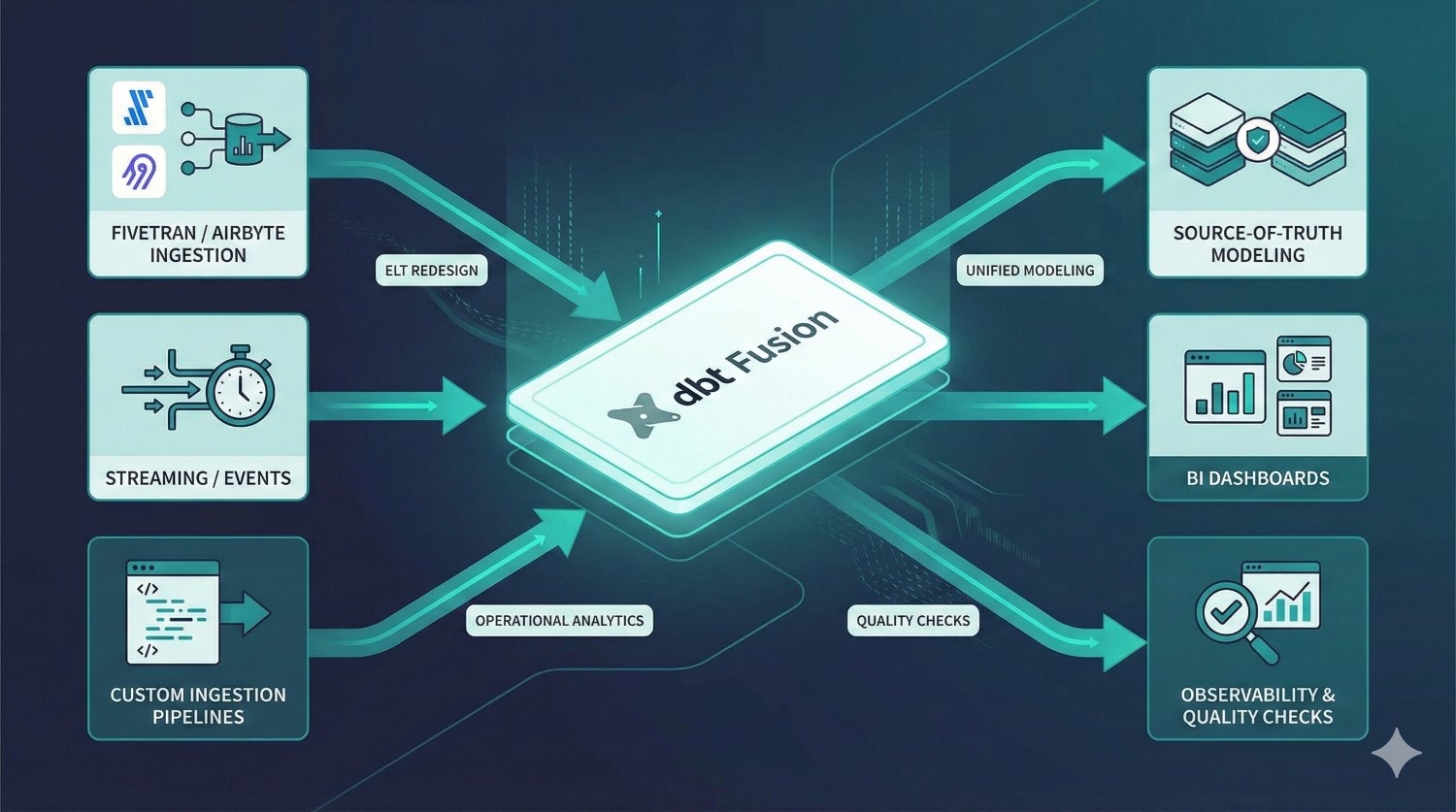
If your data workflows need more than just Fusion, DataPrism also provides:
- ELT redesign with Fivetran/Airbyte
- custom ingestion pipelines
- event streaming integrations
- source-of-truth modeling
- BI enablement strategies
- operational analytics systems
- observability & quality checks
Whether you’re on Snowflake, BigQuery, Redshift, or Databricks, we build architecture that scales as your business grows.
Conclusion
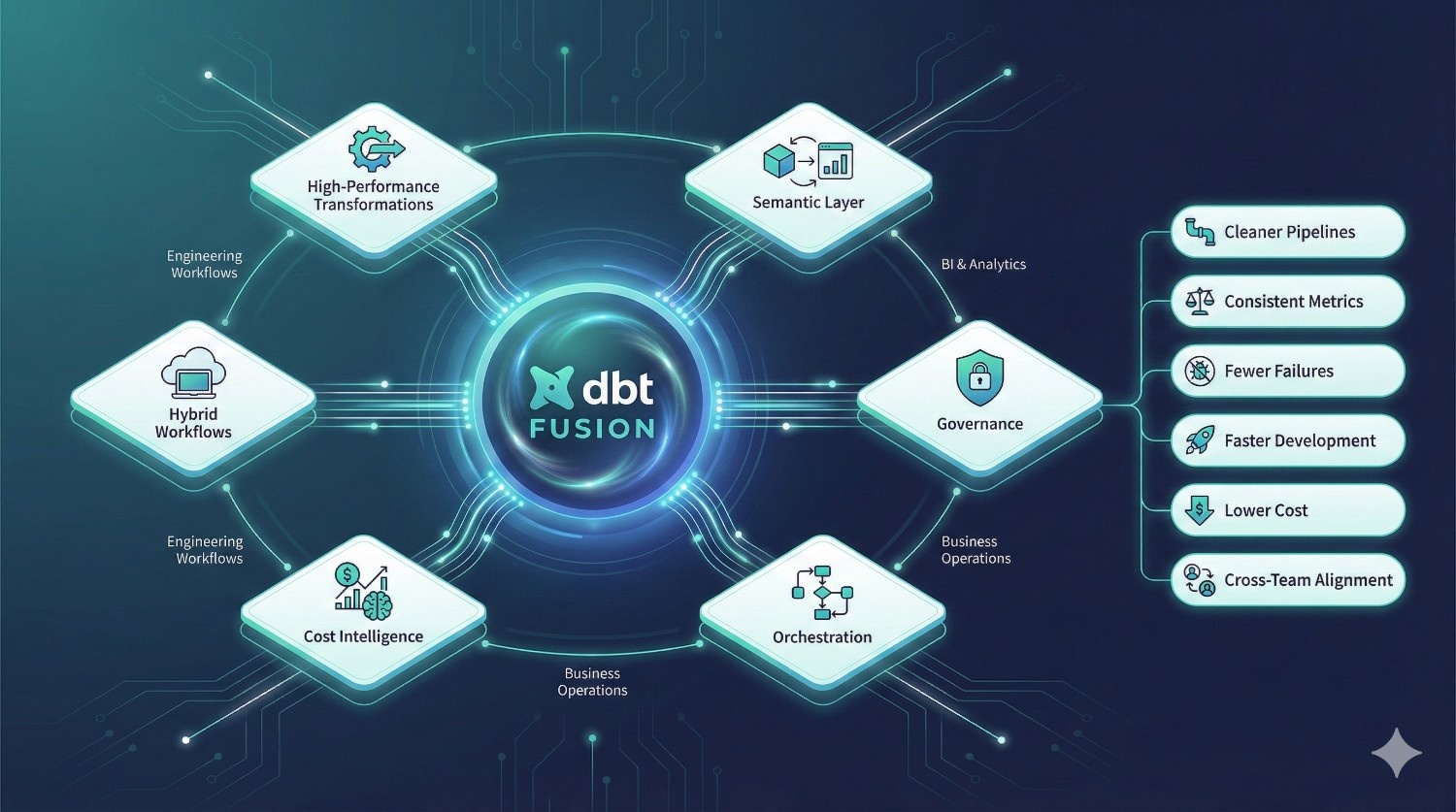
dbt Fusion represents one of the biggest upgrades in modern analytics engineering.
By combining:
- high-performance transformations
- a shared semantic layer
- built-in governance
- metadata-aware orchestration
- cost intelligence
- hybrid developer workflows
…dbt Fusion finally bridges the gap between engineering, BI, and business teams.
If your organization wants:
- cleaner, modular data pipelines
- consistent and governed metrics
- fewer production failures
- faster development cycles
- reduced warehouse cost
- reliable cross-team collaboration
- standardized definitions across all BI tools
…then dbt Fusion is likely the future foundation of your data stack.
And with the right partner — the transition can be smooth, efficient, and fully optimized for long-term scalability.
DataPrism can help you design, migrate, optimize, and operationalize dbt Fusion the right way — with engineering excellence and best practices built in.
Frequently Asked Questions (FAQs)
dbt Fusion is the next-generation dbt platform that combines development, orchestration, governance, lineage, and semantic modeling into one unified analytics engineering system. It uses a high-performance Rust engine and adds enterprise-grade features that dbt Core doesn’t provide.
dbt Core is primarily a SQL transformation framework.
dbt Fusion is a full transformation platform with:
- a Rust-based compiler
- cloud + local development
- a universal semantic layer
- native orchestration
- governance & RBAC
- cost awareness
- integrated lineage
Fusion eliminates the need for separate tools like Airflow, Monte Carlo, or LookML for many workflows.
Not necessarily. Most dbt Core projects can be migrated with some restructuring.
DataPrism typically performs a:
- model audit
- dependency check
- semantic layer mapping
- environment setup
- CI/CD alignment
The migration usually takes days, not months.
No. Smaller teams benefit from:
- faster development
- fewer broken pipelines
- zero local setup
- built-in governance
- consistent metric logic
Fusion scales from 2-person analytics teams to 200-person data organizations.
For many teams — yes.
Fusion includes metadata-aware orchestration that can schedule jobs, run only what changed, detect impacts, and prevent expensive queries.
However, complex cross-system orchestration may still use external orchestrators.
Fusion natively integrates with:
- Looker
- Sigma
- Hex
- Tableau
- Power BI
- Mode
Your KPIs and definitions stay consistent across all dashboards.
dbt Fusion introduces:
- cost estimation before runs
- avoidance of unnecessary rebuilds
- metadata-aware selective execution
- better incremental logic
- warnings for expensive queries
Teams often see reduced compute usage immediately.
Fusion makes analytics engineering more accessible through:
- cloud IDE
- governed semantic metrics
- real-time previews
- standardized templates
- structured development workflows
Analysts can contribute safely without breaking core models.
Yes. Fusion can trigger runs based on metadata changes or new data arrivals.
The platform understands DAG dependencies and freshness signals, enabling micro-batch or near-real-time execution.
For a normal dbt project (40–150 models), the migration takes:
- 1–2 weeks for setup, validation, and environment configuration
- 2–3 weeks for semantic layer creation and orchestration alignment
DataPrism offers a structured migration plan to handle everything end-to-end.
Yes.
Fusion is fully Git-native and supports:
- GitHub
- GitLab
- Bitbucket
- Azure DevOps
All commits, PRs, approvals, gates, and deployments are managed through Git.
No.
dbt Core is open-source.
dbt Fusion is a commercial, enterprise edition built on top of Core with a fully integrated platform.
Yes — dbt Fusion is the evolution of dbt Cloud.
dbt Cloud → dbt Fusion (new architecture, new engine, new features).
dbt Fusion supports:
- Snowflake
- BigQuery
- Databricks
- Redshift
- Postgres
Cost intelligence is strongest on Snowflake & BigQuery.
Because DataPrism specializes in:
- Core → Fusion migrations
- semantic layer design
- cost optimization
- CI/CD and governance setup
- warehouse performance design
- BI alignment and KPI standardization
We don’t just move your project — we upgrade it.